

2024 Cadillac CT5 Cruise Control (CC) User Guide
This tutorial covers the 2024 Cadillac CT5 Cruise Control (CC), an innovative system that maintains a fixed speed without user input, improving convenience and minimizing driver fatigue on extended trips.
2024 Cadillac CT5 Specs, Price, Features, Mileage and Review
Cruise Control
Cruise control allows the vehicle to maintain a speed of 40 km/h (25 mph) or more without active acceleration. Cruise control does not work at speeds below 40 km/h (25 mph).
Warning
Cruise control can be dangerous where you cannot drive safely at a steady speed. Do not use cruise control on winding roads or in heavy traffic.
Cruise control can be dangerous on slippery roads. On such roads, fast changes in tire traction can cause excessive wheel slip, and you could lose control. Do not use cruise control on slippery roads.
If equipped with a manual transmission, cruise control will remain active when the gears are shifted.
Cruise control will disengage if:
- The clutch pedal is applied for several seconds, if equipped with a manual transmission.
- The Traction Control System (TCS) or StabiliTrak/Electronic Stability Control (ESC) system begins to limit wheel spin. See Traction Control/Electronic Stability Control.
- TCS or StabiliTrak/ESC is turned off.
- A collision alert occurs. See Forward Collision Alert (FCA) System.
- The brakes are applied.
When road conditions allow cruise control to be safely used, cruise control can be turned back on.
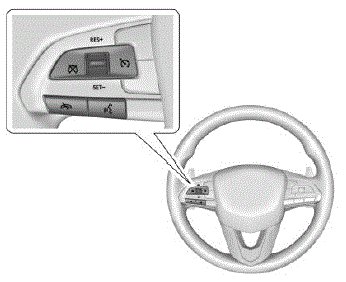

A white indicator light appears in the instrument cluster when cruise control is turned on.
RES+: If cruise control is already engaged, press the thumbwheel up to increase the set speed. If cruise control is on and there is a set speed in memory, briefly press up to resume cruise control at the previous set speed.
SET−: If cruise control is already on, briefly press the thumbwheel down to set the cruise speed and engage cruise control.
If cruise control is already engaged, press down to decrease the set speed.
 Press to disengage cruise control
without erasing the set speed from memory.
Setting Cruise Control
If cruise control is on but is not engaged, the thumbwheel could be pressed to SET− or RES+ and engage cruise control when not desired. Keep cruise control off when it is not being used. Press 5 to turn off cruise control.
To set the cruise speed:
- Press
- Accelerate to the desired speed.
- Press and release SET−. The set speed briefly appears in the instrument cluster.
- Remove your foot from the accelerator pedal.
When cruise control has been set to the desired speed, the cruise control indicator light turns green, and a cruise control set speed message is displayed briefly in the instrument cluster or in the Head-Up Display (HUD), if equipped.
Resuming a Set Speed
If cruise control is set at a desired speed and then the brakes are applied or
Once the vehicle speed reaches about 40 km/h (25 mph) or more, briefly press the thumbwheel up to RES+ to engage cruise control at the previous set speed.
Increasing Speed While Using Cruise Control
- Press and hold the thumbwheel up to the first or the second position for RES+ until the desired cruise speed is reached, then release it.
- To increase the vehicle speed in small increments, briefly press the thumbwheel up to the first position for RES+ and then release it. For each press, the vehicle speed increases by about 1 km/h (1 mph).
- To increase the vehicle speed in larger increments, briefly press the thumbwheel up to the second position for RES+ and then release it. For each press, the vehicle speed increases by about 5 km/h (5 mph).
The speedometer reading can be displayed in either English or metric units. The increment value used by cruise control depends on the units displayed by the speedometer.
Reducing Speed While Using Cruise Control
If cruise control is already engaged:
- Press and hold the thumbwheel down to the first or the second position for SET− until the desired lower cruise speed is reached, then release it.
- To decrease the vehicle speed in small increments, briefly press the thumbwheel down to the first position for SET−, and then release it. For each press, the vehicle speed decreases by about 1 km/h (1 mph).
- To decrease the vehicle speed in larger increments, briefly press the thumbwheel down to the second position for SET− and then release it. For each press, the vehicle speed decreases by about 5 km/h (5 mph).
The cruise control system may automatically brake to slow the vehicle down.
Passing Another Vehicle While Using Cruise Control
Use the accelerator pedal to increase the vehicle speed. When you take your foot off of the accelerator pedal, the vehicle will slow down to the previous set cruise speed. While pressing the accelerator pedal or shortly following the release to override cruise control, briefly pressing the thumbwheel down to SET− will result in the cruise speed being set to the current vehicle speed.
Using Cruise Control on Hills
How well cruise control works on a hill depends on the vehicle speed, load, and the steepness of the hill. When going up a steep hill, you may need to apply the accelerator pedal to maintain the set speed.
When going down a steep hill, to maintain the desired cruise speed, you may need to:
- Apply the brake pedal
- Apply the brake pedal and/or shift to a lower gear, if equipped with a manual transmission
If you apply the brake pedal, cruise control disengages. See “Resuming a Set Speed” previously in this section.
Ending Cruise Control
There are five ways to end cruise control:
Lightly apply the brake pedal.
- Press
- Shift the transmission to N (Neutral).
- Press the clutch pedal for several seconds or shift to N (Neutral) (manual transmissions).
- Press
Erasing Speed Memory
The cruise control set speed is erased from memory if
is pressed and when the vehicle is turned off.