


2026 Chevrolet Equinox Displays User Guide
Understand about the 2026 Chevrolet Equinox Displays, including key features, functions, and settings. Experience enhanced driving with clear visuals, intuitive controls, and customizable information layouts.
Video: 2026 Chevrolet Equinox Dashboard Warning Indicators
Information Displays
Driver Information Center (DIC)
The DIC is displayed in the instrument cluster. It shows the status of many vehicle systems.
DIC information is broken down into two main zones:
Left Zone
Displays on the instrument cluster to the left of the speedometer.
Right Zone
Displays on the instrument cluster to the right of the speedometer.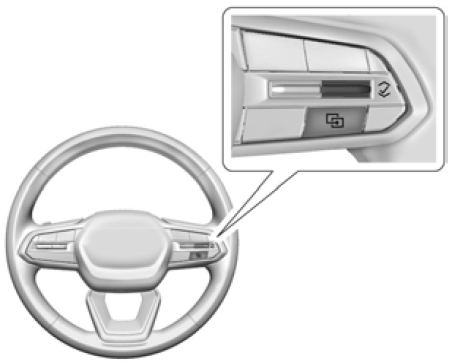

 Press to open a menu or select a menu item. Press and hold to reset certain displays.
DIC Information Display Options
Select which info display to view on the DIC by selecting Add to Driver Display in the Vehicle Status on the infotainment display.
DIC Information Displays
The following is the list of all possible DIC information displays and their locations. Some of the information displays may not be available for your particular vehicle.
Left Zone
Trip Information
The Trip 1 or 2 display shows the current distance traveled, in either kilometers (km) or miles (mi), since the trip odometer was last reset. To reset the current trip, touch and hold the touchscreen display when trip odometer is displayed on the vehicle status screen.
The Average Fuel Economy display shows the approximate average liters per 100 kilometers (L/100 km), kilometers per liter (km/L), or miles per gallon (mpg). This number is calculated based on the number of L/100 km (mpg) or km/L recorded since the last time this menu item was reset. This number reflects only the approximate average fuel economy that the vehicle has right now, and will change as driving conditions change. The Average Fuel Economy can be reset along with the trip odometer by touching and holding the touchscreen display when trip odometer is displayed on the vehicle status screen.
Current Trip
Displays distance driven, fuel economy, and time elapsed since vehicle startup. It resets when you turn your vehicle off.
Time/Date: Displays current date, time, and temperature information.
Battery Voltage
Displays the current battery voltage.
Oil Life
Displays an estimate of the remaining oil life. If REMAINING OIL LIFE 99% is displayed, that means 99% of the current oil life remains.
When the remaining oil life is low, the CHANGE ENGINE OIL SOON message will appear on the display. The oil should be changed as soon as possible. In addition to the engine oil life system monitoring the oil life, additional maintenance is recommended.
The Oil Life display must be reset after each oil change. It will not reset itself. Do not reset the Oil Life display at any time other than when the oil has just been changed. It cannot be reset accurately until the next oil change.
Fuel Economy
Displays information about current and average fuel economy.
Oil Pressure
Displays the engine oil pressure in kPa (kilopascals) or psi (pounds per square inch).
Engine Hours
Displays the total number of hours the engine has run. This display also shows the engine idle hours.
Coolant Temperature
Displays the temperature of the coolant in either degrees Celsius (°C) or degrees Fahrenheit (°F).
Transmission Fluid Temperature
Displays the temperature of the automatic transmission fluid in either degrees Celsius (°C) or degrees Fahrenheit (°F).
Tire Pressure
Displays the approximate pressures of all four tires. Tire pressure is displayed in either kilopascal (kPa) or in pounds per square inch (psi). If the pressure is low, the value for that tire is shown in amber. See Tire Pressure Monitor System and Tire Pressure Monitor Operation.
Brake Pad Life
Displays an estimate of the remaining life of the front and back brake pads. Messages are displayed based on brake pad wear and the state of the system. Reset the Brake Pad Life display after replacing the brake pads.
Air Filter Life
Displays an estimate of the remaining engine air filter life and the state of the system. Engine Air Filter Life 95% means 95% of the current air filter life remains. Messages will display based on the engine air filter life and the state of the system. When the REPLACE AT NEXT OIL CHANGE message displays, the engine air filter should be replaced at the time of the next oil change. When the REPLACE SOON message displays, the engine air filter should be replaced at the earliest convenience.
The Air Filter Life display must be reset after the engine air filter replacement.
Oil Temperature
Displays the current oil temperature in either degrees Celsius (°C) or degrees Fahrenheit (°F).
Off
Allows for no information to be displayed in the cluster info display areas.
Right Zone
Audio Now Playing: Displays the actively playing audio.
Navigation
Displays a variety of navigation information.
Phone
Displays a variety of call information.
Off
Allows for no information to be displayed in the cluster info display areas.
Vehicle Status
To access the menu select the Vehicle Status icon from the infotainment home screen. Vehicle status content is grouped and shown on the infotainment display.
Selecting vehicle status content on the infotainment display shows the available options. Follow any message or alerts that may be displayed. Some options may be unavailable while driving.
Touch Add to Driver Display to send the desired content to the Driver Information Center (DIC) on the instrument cluster. Touch Remove from Display to remove the selected content from the instrument cluster.
Options
The following is the list of all possible vehicle status content and locations. Some but not all of the content and options may be available for your particular vehicle.
Overview
Displays an interactive image of your vehicle that shows performance and health information.
Maintenance
Tire Pressure
Displays the approximate pressures of all four tires. Tire pressure is displayed in either kilopascal (kPa) or in pounds per square inch (psi). If the pressure is low, the value for that tire is shown in amber. See Tire Pressure Monitor and Tire Pressure Monitor Operation.
The following options may be chosen: Relearn Sensors, and Add to Driver Display.
Brake Pad Life
Displays an estimate of the remaining life of the front and back brake pads. Messages are displayed based on brake pad wear and the state of the system.
The following options may be chosen: Turn Off/On, Reset Front Brake Pads, Reset Back Brake Pads, and Add to Driver Display. Reset the Brake Pad Life after replacing the brake pads.
Oil Life
Displays an estimate of the remaining oil life. If REMAINING OIL LIFE 99% is displayed, that means 99% of the current oil life remains.
When the remaining oil life is low, the CHANGE ENGINE OIL SOON message will appear on the display. The oil should be changed as soon as possible. In addition to the engine oil life system monitoring the oil life, additional maintenance is recommended.
The following options may be chosen: Reset, and Add to Driver Display. The Oil Life must be reset after each oil change. It will not reset itself. Do not reset the Oil Life display at any time other than when the oil has just been changed. It cannot be reset accurately until the next oil change.
Engine Air Filter Life
Displays an estimate of the remaining engine air filter life and the state of the system. Engine Air Filter Life 95%means 95% of the current air filter life remains. Messages are displayed based on the engine air filter life and the state of the system. When the REPLACE AT NEXT OIL CHANGE message displays, the engine air filter should be replaced at the time of the next oil change. When the REPLACE NOW message displays, the engine air filter should be replaced as soon as possible.
The Air Filter Life display must be reset after the engine air filter replacement.
The following options may be chosen: Turn Off/On, Reset, and Add to Driver Display.
Gauges
Battery Voltage
Displays the current battery voltage. Add to Driver Display may be chosen. Coolant Temperature: Displays the temperature of the coolant in either degrees Celsius (°C) or degrees Fahrenheit (°F). Add to Driver Display may be chosen.
Transmission Fluid Temperature
Displays the temperature of the automatic transmission fluid in either degrees Celsius (°C) or degrees Fahrenheit (°F). Add to Driver Display may be chosen.
Oil Pressure
Displays the engine oil pressure in kPa (kilopascals) or psi (pounds per square inch). Add to Driver Display may be chosen.
Oil Temperature
Displays the current oil temperature in either degrees Celsius (°C) or degrees Fahrenheit (°F). Add to Driver Display may be chosen.
Trip
Trip Information
Trip 1 or 2 displays the current distance traveled, in either kilometer (km) or miles (mi), since the trip odometer was last reset.Average Fuel Economy displays the approximate average liters per 100 kilometers (L/100 km) or miles per gallon (mpg). This number is calculated based on the number of L/100 km (mpg) recorded since the last time this menu item was reset. This number reflects only the current, approximate average fuel economy and changes as driving conditions change.
To reset these values, touch reset on the touchscreen display when the Trip Information dialog is selected.
The following options may be chosen: Reset Trip 1, Reset Trip 2, and Add to Driver Display.
Fuel Economy
Displays average fuel economy, the best fuel economy over the selected distance, and a bar graph showing instantaneous fuel economy. Values are displayed in litres per 100 kilometres (L/100 km) or miles per gallon (mpg). This number reflects only the approximate fuel economy and changes frequently as driving conditions change. Only the best score can be reset.
If the vehicle is equipped with an Active Fuel Management indicator, the engine operating mode will be shown in this display.
The following options may be chosen: Change Distance, Reset Best Score, and Add to Driver Display. The distance for average fuel economy and the best fuel economy can be changed to: 40 km (25 mi), 80 km (50 mi), and 725 km (300 mi).
Current Trip
Displays the current distance travelled, in either kilometres (km) or miles (mi). It also includes the Average Fuel Economy. Average Fuel Economy shows the approximate average litres per 100 kilometres (L/100 km), kilometres per litre (km/L), or miles per gallon (mpg). This number only reflects the approximate Average Fuel Economy that the vehicle has at that moment, and changes as driving conditions change. The timer shows the time in the current drive cycle.
All values in the Drive Summary are automatically reset each time the vehicle is started. Add to Driver Display may be chosen.
Engine Hours
Displays the total number of hours the engine has run. This display also shows the engine idle hours. Add to Driver Display may be chosen.
Vehicle Messages
Messages displayed on the Driver Information Center (DIC) indicate the status of the vehicle or some action that may be needed to correct a condition. Multiple messages may appear one after another.
Vehicle status notifications are also sent to the infotainment display. Touching  on the infotainment home screen displays active vehicle messages. Depending on the message, you can schedule a service or find the nearest dealer. When there are active messages that can be viewed, a red dot appears on top of the notification icon on the infotainment display. The messages that do not require immediate action can be acknowledged and cleared by pressing V. The messages that require immediate action cannot be cleared until that action is performed.
- Service Messages
- Fluid Levels
- Vehicle Security
- Brakes
- Ride Control Systems
- Advanced Driver Assistance Systems
- Cruise Control
- Lighting and Bulb Replacement
- Wiper/Washer Systems
- Doors and Windows
- Seat Belts
- Airbag Systems
- Engine and Transmission
- Tire Pressure
- Battery
- Steering
Engine Power Messages
REDUCED ACCELERATION DRIVE WITH CARE
This message displays when the vehicle’s propulsion power is reduced. A reduction in propulsion power can affect the vehicle’s ability to accelerate. If this message is on, but there is no observed reduction in performance, proceed to your destination. Under certain conditions, the performance may be reduced the next time the vehicle is driven. The vehicle may be driven while this message is on, but maximum acceleration and speed may be reduced. Anytime this message stays on or displays repeatedly, the vehicle should be taken to your dealer for service as soon as possible.
Under certain operating conditions, propulsion will be disabled. Try restarting after the ignition has been off for two minutes.
Vehicle Speed Messages
SPEED LIMITED TO XXX KM/H (MPH)
This message shows that the vehicle speed has been limited to the speed displayed. The limited speed is a protection for various propulsion and vehicle systems, such as lubrication; thermal; brakes; suspension; Teen Driver, if equipped; or tyres.
Useful Links:
2024 Chevrolet EQUINOX Specs, Price, Features, Mileage (Brochure)
2026 Chevrolet Equinox Instrument Cluster User Guide
2026 Chevrolet Equinox Warning Lights and Indicators User Guide