
2025 GMC Canyon Four-Wheel Drive User Guide
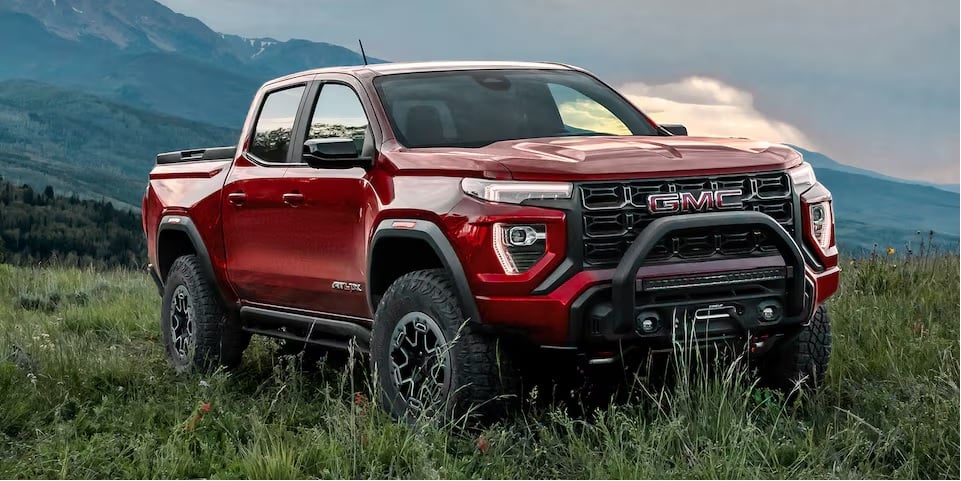
Built for adventure, the 2025 GMC Canyon Four-Wheel Drive combines cutting-edge technology with tough performance. This midsize truck is a great choice for drivers who require strength and versatility since it combines power, accuracy, and style whether you’re navigating city streets or off-road tracks.
Drive Systems
Four-Wheel Drive
If equipped, four-wheel drive engages the front axle for extra traction. Read the appropriate section for transfer case operation before using.
Caution
Do not drive on clean, dry pavement in 4 m and 4 n (if equipped) for an extended period of time. These conditions may cause premature wear on the vehicle’s powertrain.
Driving on clean, dry pavement in 4 m or 4 n may:
- Cause a vibration to be felt in the steering system.
- Cause tires to wear faster.
Warning
If equipped with four-wheel drive, the vehicle will be free to roll if the transfer case is in N (Neutral), even when the shift lever is in P (Park). You or someone else could be seriously injured. Be sure the
the transfer case is in a drive gear — 2 m, 4 m, or 4 n — or set the parking brake before placing the transfer case in N (Neutral).
Caution
Extended high-speed operation in 4 n may damage or shorten the life of the drivetrain.
An engagement noise and bump is normal when shifting between 4 n and 4 m or N (Neutral), with the engine running. Shifting into 4 n will turn Traction Control and Electronic Stability Control (ESC) off.
Traction Control/Electronic Stability Control
Automatic Transfer Case
Two-Speed Transfer Case

If equipped, the transfer case controls are used to shift into and out of four-wheel drive. To shift the transfer case, press the desired button. The graphic in the instrument cluster will flash while a shift is in progress. The graphic displayed will change to indicate the setting requested. When the shift is complete the graphic will stop flashing. The DIC message turns off once the shift is complete. If the transfer case cannot complete a shift request, it will go back to its last chosen setting.
The settings are:
N (Neutral): Use only when the vehicle needs to be towed. See Recreational Vehicle Towing or Transporting a Disabled Vehicle .
2 m (Two-Wheel Drive High): Use for driving on most streets and highways. The front axle is not engaged. This setting provides the best fuel economy.
AUTO (Automatic Four-Wheel Drive): Use when road surface conditions are variable. When driving in AUTO, the front axle is engaged, and the vehicle’s power is sent to the front and rear wheels automatically based on driving conditions. This setting provides slightly lower fuel economy than 2 m.
4 m (Four-Wheel Drive High): Use this setting when extra traction is needed, such as when driving on snowy or icy roads, when off-roading, or when plowing snow.
4 n (Four-Wheel Drive Low): This setting engages the front axle and delivers extra torque. Choose 4 n when driving off-road in deep sand, deep mud, or deep snow, and while climbing or descending steep hills. While driving in 4 n, keep vehicle speed below 72 km/h (45 mph). Shifting into 4 n will turn Traction Control and ESC off.
Shifts between 2m, 4 m, and AUTO
Any of these shifts can be made at normal driving speed. The actual 4×4 shift request is only made after the button is released. The 4×4 graphic will remain flashing until the shift request has completed. A DIC message displays to indicate that the 4×4 transfer case has been requested to shift to the new desired state. Once the 4×4 shift has been completed, the DIC message disappears, the 4×4 graphic stops flashing, and the current setting is indicated. When a shift to 2 m is completed successfully while in P (Park), the parking brake will engage. To resume driving, shift the transmission to the desired gear and manually release the parking brake or press the accelerator pedal to begin driving. If equipped, use 4 n, AUTO, or 4 m to provide additional traction when parking on a steep grade with poor traction such as ice, snow, mud, or gravel.
Shifting Into 4 n
- The ignition must be on and the vehicle must be stopped or moving less than 5 km/h (3 mph) with the transmission in N (Neutral). It is best for the vehicle to be moving 1.6 to 3.2 km/h (1 to 2 mph).
- Press 4 n. The actual 4×4 shift request is only made after the button is released. The 4×4 graphic will remain flashing until the shift request has completed. A DIC message displays to indicate that the 4×4 transfer case has been requested to shift to the new desired state. Once the 4×4 shift has completed, the DIC message disappears, the 4×4 graphic stops flashing and the current setting is indicated.
If vehicle speed is higher when shift request occurs, a DIC message displays. Reduce vehicle speed. If the transmission is not in N (Neutral) when shift request occurs, a DIC message displays. The vehicle will allow 20 seconds Driving and Operating for the shift to occur. After this time, a graphic in the instrument cluster will indicate that the transfer case is in 4 n.
Caution
Shifting the transmission into gear before the requested mode indicator light has stopped flashing could damage the transfer case.
If the transmission is not shifted into N (Neutral) or the vehicle has not slowed to 5 km/h (3 mph) within 20 seconds, the transfer case will remain in its original state. This will be indicated in the instrument cluster. With the vehicle moving less than 5 km/h (3 mph) and the transmission in N (Neutral), attempt the shift again.
Shifting Out of 4 n
- The vehicle must be stopped or moving less than 5 km/h (3 mph) with the transmission in N (Neutral) and the ignition on. It is best for the vehicle to be moving 1.6 to 3.2 km/h (1 to 2 mph).
- Press 4 m, AUTO, or 2 m. The actual 4×4 shift request is only made after the button is released. The 4×4 graphic will remain flashing until the shift request has completed. A DIC message displays to indicate the state of the request. Once the 4×4 shift has completed, the DIC message disappears, the 4×4 graphic stops flashing, and the current setting is indicated. If vehicle speed is higher when shift request occurs, a DIC message displays. Reduce vehicle speed.
If the transmission is not in N (Neutral) when shift request occurs, DIC messages will display. The vehicle will allow 20 seconds for this shift to occur. After this time, a graphic in the instrument cluster will indicate that the transfer case is in 4 n.
Caution
Shifting the transmission into gear before the requested mode indicator light has stopped flashing could damage the transfer case. If the transmission is not shifted into N (Neutral) or the vehicle has not slowed to 5 km/h (3 mph) within 20 seconds, the transfer case will remain in its original state. This will be indicated in the instrument cluster. With the vehicle moving less than 5 km/h (3 mph), and the transmission in N (Neutral), attempt the shift again.
Shifting Into N (Neutral)
To shift into N (Neutral):
- Start the vehicle.
- Shift the transmission to N (Neutral).
- Shift the transfer case to 2 m.
- Apply the parking brake and/or brake pedal.
- Press 2 m five times in 10 seconds until the N (Neutral) graphic starts flashing in the instrument cluster. When the shift is complete, the graphic stops flashing. If the parking brake and/or brake pedal is not applied within 20 seconds, the transfer case will remain in the original state.
- If the transmission is not shifted into N (Neutral) or the vehicle has not slowed to 5 km/h (3 mph) within 20 seconds, the transfer case will remain in its original state. This will be indicated in the instrument cluster.
Shifting Out of N (Neutral)
To shift out of N (Neutral):
- Turn the ignition on with the engine off. See Ignition Positions
Set the parking brake. - Shift the transmission to N (Neutral).
- Shift the transfer case to 2 m. Transfer case shifts out of N (Neutral) can only be made into 2 m. When the shift to 2 m is complete, the graphic in the instrument cluster will stop flashing. If the transfer case cannot complete a shift, the graphic will return to the previously selected setting.
Single Speed Transfer Case

If equipped, the transfer case controls are used to shift into and out of four-wheel drive. To shift the transfer case, press the desired button. The graphic in the instrument cluster will flash while a shift is in progress. The graphic displayed will change to indicate the setting requested. When the shift is complete the graphic will stop flashing. The DIC message turns off once the shift is complete. If the transfer
case cannot complete a shift request, it will go back to its last chosen setting.
The settings are 2 m (Two-Wheel Drive High): Use for driving
on most streets and highways. The front axle is not engaged. This setting provides the best fuel economy.
4 m (Four-Wheel Drive High): Use this setting when extra traction is needed, such as when driving on snowy or icy roads, when off-roading, or when plowing snow. AUTO (Automatic Four-Wheel Drive) Use when road surface conditions are variable. When driving in AUTO, the front axle is engaged, and the vehicle’s power is sent to the front and rear wheels automatically based on driving conditions. This setting provides slightly lower fuel economy than 2 m.
Shifts between 2 m, 4 m, and AUTO
Any of these shifts can be made at normal driving speed. The actual 4×4 shift request is only made after the button is released. The 4×4 graphic will remain flashing until the shift request has completed. A DIC message displays. Once the 4×4 shift has completed, the DIC message disappears, the 4×4 graphic stops flashing, and the current setting is indicated. The actual 4×4 shift request is only made after the button is released. The 4×4 graphic will remain flashing until the shift request has completed. A DIC message displays. Once the 4×4 shift has completed, the DIC message disappears, the 4×4 graphic stops flashing, and the current setting is indicated.
Useful Links:
2023 – 2024 GMC CANYON Review, Price, Features and Mileage (Brochure)