

2025 GMC Terrain Instrument Cluster User Guide
We will examine the features, operation, and indicator interpretation of the 2025 GMC Terrain Instrument Cluster in this article. Use this crucial information to improve your driving experience and ensure your car performs at its best.
2023 – 2024 GMC TERRAIN Review, Price, Features and Mileage (Brochure)
Video: 2025 GMC Terrain Dashboard Warning Indicators
GMC Instrument Cluster Guide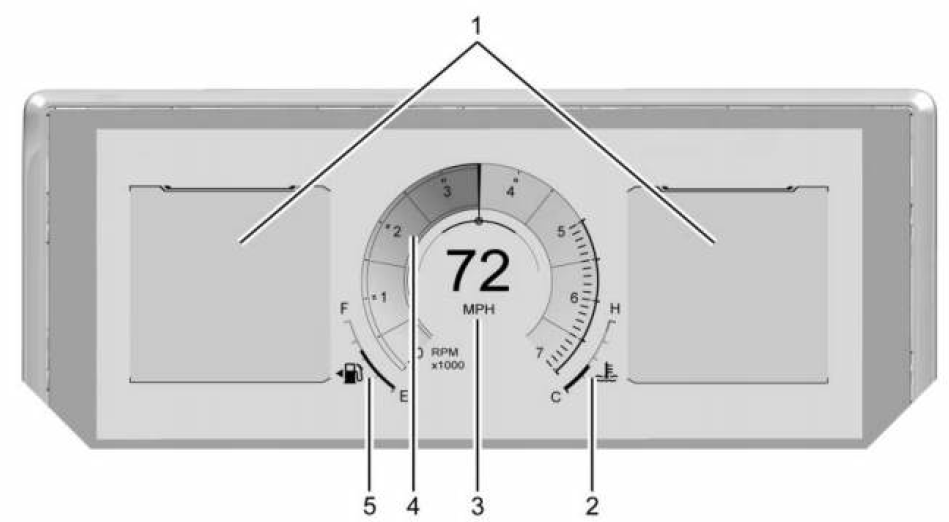
English Single Gauge Layout Shown, Other Layouts, and Metric Similar
- Driver Information Center (DIC)
- Engine Coolant Temperature Gauge
- Speedometer
- Tachometer
- Fuel Gauge
Reconfigurable Instrument Cluster
The cluster display layout can be changed. Some of the selectable views may not be available for your particular vehicle.
The following are selectable views:
Clean
If equipped, displays no
information zones.
Single Gauge
Displays two information zones that are located to the left and right of the display. The gauges are located in the middle of the display.
Dual Gauge
If equipped, displays the speedometer and tachometer to the left and right of the information zone. The gauges are located to the left and right of the speedometer and tachometer.
Map
Displays a navigation map.
Driver Assistance
If equipped, displays information for Adaptive Cruise Control (ACC), Follow Distance, Lane Keep Assist (LKA), Forward Collision Alert (FCA), and Super Cruise. There is one information zone to the right of the display.
Off Road
If equipped, displays vehicle pitch and roll information, road wheel angle, and all-wheel drive (AWD) status. The speedometer is in the center of the display. The compass is located to the left of the display. There are four gauges on the left and right of the display.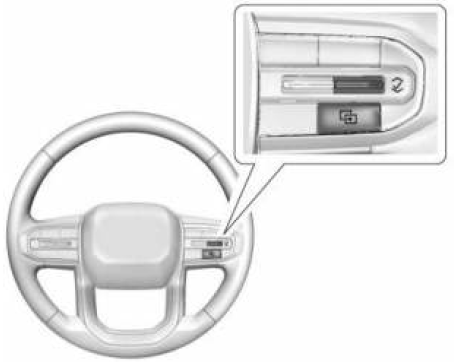
Use the right steering wheel control to open and scroll through the different items and displays. To change the cluster configuration, press i on the right steering wheel control. If equipped, to change the gauge faces, press and hold i and use y or z on the right steering wheel control. Press V on the right steering wheel control to select the desired option from the list. The following conditional gauges may be displayed while in a particular driver mode:
- Engine Oil Temperature
- Engine Oil Pressure
- Transmission Temperature
Display Settings
The following options can be turned on or off using the infotainment display. Some may not be available for your particular vehicle. See Settings .
Speed Sign
Shows sign information from a roadway database in the onboard navigation. The sign will show “− −” when there is no detected speed limit or the system is unavailable.
Turn-by-Turn Graphics
Provides Turn-by-Turn navigation graphics during an active route in your driver display.
Traffic Sign Recognition
Displays the detected speed limit in your driver display.
Speedometer
The speedometer shows the vehicle speed in either kilometers per hour (km/h) or miles per hour (mph).
Odometer
The odometer shows how far the vehicle has been driven, in either kilometers or miles.
Trip Odometer
The trip odometer shows how far the vehicle has been driven since the trip odometer was last reset. The trip odometer is accessed and reset through the Vehicle Status. See Vehicle Status.
Tachometer
The tachometer displays the engine speed in revolutions per minute (rpm). The tachometer may vary by several hundred rpm, during Auto Stop mode, when the engine is shutting off and restarting.
Fuel Gauge Metric
 English
When the ignition is on, the fuel gauge indicates about how much fuel is left in the tank. There is an arrow near the fuel gauge pointing to the side of the vehicle the fuel door is on. When the indicator nears empty, the low fuel light comes on. There still is a little fuel left, but the vehicle should be refueled soon.
The fuel gauge may:
- Take a little more, or less fuel to fill up than it indicates. For example, the gauge may have indicated the tank is half full, but it actually will take a little more, or less than half the tank’s capacity to fill the tank.
- Moves a little while driving on a hill, turning a corner, speeding up, or braking.
- Take a few seconds to stabilize after the ignition is turned on and goes back to empty when the ignition is turned off.
These are normal conditions, none of which indicate a problem with the fuel gauge.
Engine Oil Temperature Gauge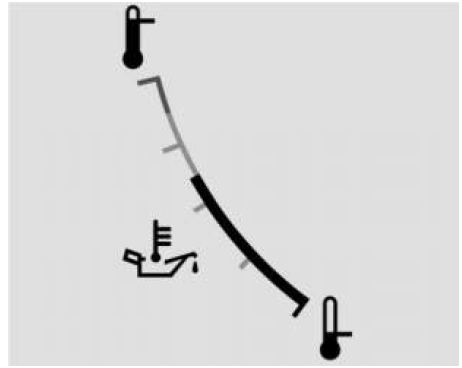
 English
If equipped, this gauge shows the engine oil temperature. If the gauge pointer moves into the high end, it means that the engine oil has overheated. If the vehicle has been operated under normal driving conditions, pull off the road, stop the vehicle, and turn off the engine as soon as possible.
Engine Coolant Temperature Gauge Metric
This gauge shows the engine coolant temperature. If the pointer moves toward the warning area at the high end of the gauge, the engine is too hot. This reading indicates the same thing as the warning light. It means that the engine coolant has overheated. If the vehicle has been operating under normal driving conditions, pull off the road, stop the vehicle, and turn off the engine as soon as possible.
2023 – 2024 GMC TERRAIN Review, Price, Features and Mileage (Brochure)
Transmission Temperature Gauge
Metric
English
Caution
Do not drive the vehicle while the transmission fluid is overheating, or the transmission can be damaged. This could lead to costly repairs that would not be covered by the warranty.
If equipped, the transmission temperature gauge shows the transmission fluid temperature. If the gauge is reading in the red area and/or a message appears in the Driver Information Center (DIC), the vehicle must be stopped and the cause checked. One possible cause is a low fluid level in the transmission.
Useful Links:
2023 – 2024 GMC TERRAIN Review, Price, Features and Mileage (Brochure)
2025 GMC Terrain Warning Lights and Indicator User Guide
2025 GMC Terrain Displays User Guide