


2023 Jeep Grand Cherokee Instrument Panel User Guide
This Guide covers the 2023 Jeep Grand Cherokee Instrument Panel. This panel displays speed, fuel levels, and cautions to make driving easier and clearer.
2023 Jeep Grand Cherokee Specs, Price, Features, Mileage and Torque
Video: 2023 Jeep Grand Cherokee Dashboard Warning Indicators
DIGITAL INSTRUMENT CLUSTER
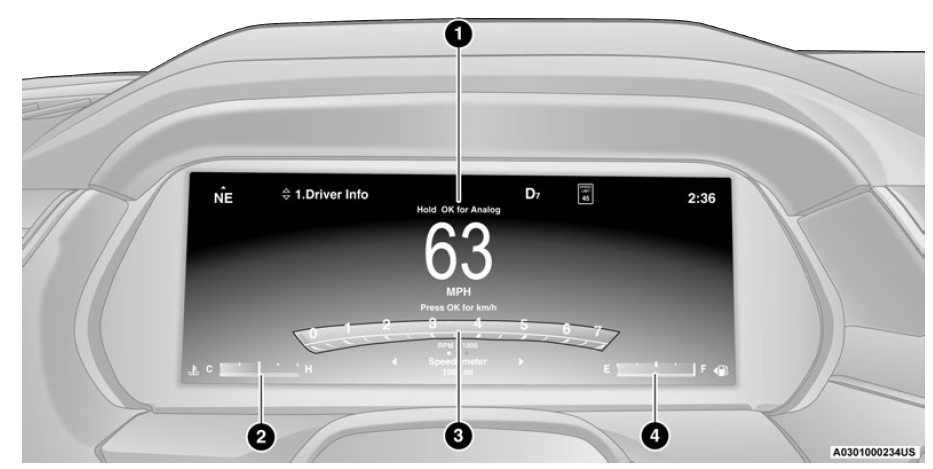
Holding the OK button on the Instrument Cluster Display controls located on the steering wheel will allow you to change your display from Digital to Analog.
DIGITAL INSTRUMENT CLUSTER DESCRIPTIONS
- Use this QR code to access your digital experience.
- Speedometer
- Indicates vehicle speed.
- Temperature Gauge
- The temperature gauge shows engine coolant temperature. Any reading within the normal range indicates that the engine cooling system is operating satisfactorily.
- The pointer will likely indicate a higher temperature when driving in hot weather, up mountain grades, or when towing a trailer. It should not be allowed to exceed the upper limits of the normal operating range.
WARNING! A hot engine cooling system is dangerous. You or others could be badly burned by steam or boiling coolant. It is recommended to call an authorized dealer for service if your vehicle overheats Ú page 301.
CAUTION! Driving with a hot engine cooling system could damage your vehicle. If the temperature gauge reads “H” pull over and stop the vehicle. Idle the vehicle with the air conditioner turned off until the pointer drops back into the normal range. If the pointer remains on the “H”, turn the engine off immediately and call an authorized dealer for service.
- Tachometer
- Indicates the engine speed in revolutions per minute (RPM x 1000).
- Fuel Gauge
- The pointer shows the level of fuel in the fuel tank when the Keyless Push Button Ignition is in the ON/RUN position.
 The fuel pump symbol points to the side of the vehicle where the fuel door is located.
NOTE: The 2023 Jeep Grand Cherokee Instrument Cluster Warning Indicators will illuminate briefly for a bulb check when the ignition is first cycled.
- Speedometer
ANALOG INSTRUMENT CLUSTER
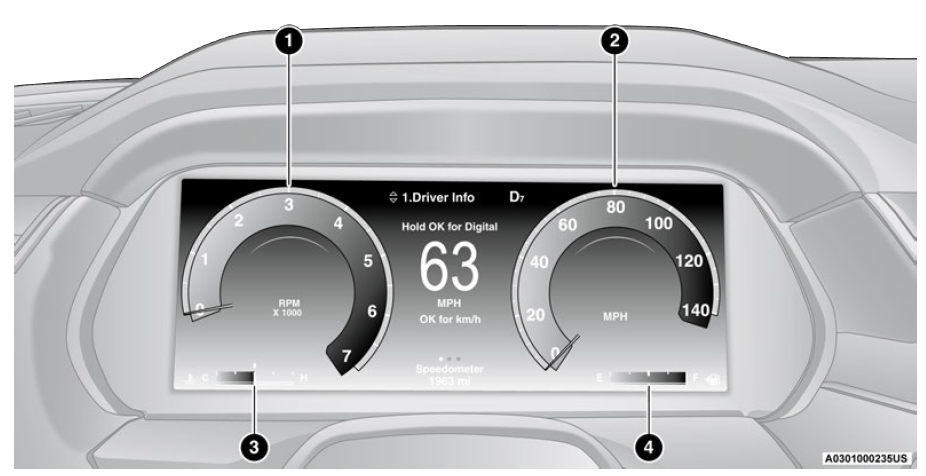
Holding the OK button on the Instrument Cluster Display controls located on the steering wheel will allow you to change your display from Analog to Digital.
ANALOG INSTRUMENT CLUSTER DESCRIPTIONS
- Tachometer
- Indicates the engine speed in revolutions per minute (RPM x 1000).
- Speedometer
- Indicates vehicle speed.
- Temperature Gauge
- The temperature gauge shows engine coolant temperature. Any reading within the normal range indicates that the engine cooling system is operating satisfactorily.
- The pointer will likely indicate a higher temperature when driving in hot weather, up mountain grades, or when towing a trailer. It should not be allowed to exceed the upper limits of the normal operating range.
WARNING! A hot engine cooling system is dangerous. You or others could be badly burned by steam or boiling coolant. It is recommended to call an authorized dealer for service if your vehicle overheats Ú page 301.
CAUTION! Driving with a hot engine cooling system could damage your vehicle. If the temperature gauge reads “H” pull over and stop the vehicle. Idle the vehicle with the air conditioner turned off until the pointer drops back into the normal range. If the pointer remains on the “H”, turn the engine off immediately and call an authorized dealer for service. - Fuel Gauge
- The pointer shows the level of fuel in the fuel tank when the Keyless Push Button Ignition is in the ON/RUN position.
 The fuel pump symbol points to the side of the vehicle where the fuel door is located.
NOTE: The Instrument Cluster Warning Indicators will illuminate briefly for a bulb check when the ignition is first cycled.
2023 Jeep Grand Cherokee INSTRUMENT CLUSTER DISPLAY
Depending on your vehicles trim level, features and options may vary. Your vehicle will be equipped with an instrument cluster display, which offers useful information to the driver. With the ignition in the OFF mode, opening/closing of a door will activate the display for viewing, and display the total miles, or kilometers, in the odometer. Your instrument cluster display is designed to display important information about your vehicle’s systems and features. Using a driver interactive display located on the instrument panel, your instrument cluster display can show you how systems are working and give you warnings when they are not. The steering wheel-mounted controls allow you to scroll through the main menus and submenus. You can access the specific information you want and make selections and adjustments.
LOCATION AND CONTROLS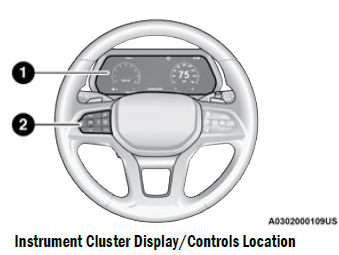
- Instrument Cluster Display Screen
- Instrument Cluster Display Controls
The system allows the driver to select information by pushing the following buttons mounted on the steering wheel:
- Up Arrow Button
- OK Button
- Menu Button
- Left Arrow Button
- Down Arrow Button
- Right Arrow Button
- Up Arrow Button
Push and release the up arrow button to scroll upward through the main menu. - OK Button
Push the OK button to access/select the information screens or submenu screens of a main menu item. Push and hold the OK button for one second to reset displayed/selected features that can be reset. - MENU Button
Push the MENU button to access/select the information screens or submenu screens of the Home Screen display. Push and hold the OK button to enter edit mode. - Left Arrow Button
Push the left arrow button to return to the main menu from an info screen or submenu item. - Down Arrow Button
Push and release the down arrow button to scroll downward through the main menu. - Right Arrow Button
Push and release the right arrow button to access the information screens or submenu screens of a main menu item.
Display Options
Holding OK will also allow you to change your display to Digital or Analog.
- Digital theme will be the default theme
- Menu screen times out after 10 seconds. Press OK to reactivate
- Speedometer must always be present
- Relevant warning notifications and other pop-up info will still be displayed in the main screen area (In this case the speed moves to the top)
Custom Tile Configuration
To customize the instrument cluster further, you are able to select up to five tiles to display information based on your needs.
- Press the MENU button for the Home Screen display

- Navigate Left or Right to highlight desired tile
- Press OK to select the tile and navigate to the selected submenu and press OK again to add your selection to your tile view
- The main menu options of the home screen are Driver Info, Vehicle Info, Navigation — If Equipped, Audio, and Off Road
You can customize your Instrument Cluster Display with up to five tiles that may consist of the following:
NOTE: These options may vary based on your vehicle trim level.
Home Screen Options
- Navigation — If Equipped
- Map Display
- Trip A/B
- Vehicle Info
- Coolant Temp
- Trans Temp
- Oil Temp
- Oil Pressure
- Battery Voltage
- Oil Life
- Tire Pressure
- Fuel Economy
- Stop/Start
- Driver Info — If Equipped
- Posted Speed Limit Sign
- Driver Assist
- Audio
- Audio Info
- Off Road — If Equipped
- Selec-Terrain Status/ Air Suspension Status — If Equipped
- Steering Angle
- Pitch & Roll
ENGINE OIL LIFE RESET
Use this QR code to access your digital experience.
- Oil Change Required
Your vehicle is equipped with an engine oil change indicator system. The “Oil Change Required” message will display in the instrument cluster display for five seconds after a single chime has sounded, to indicate the next scheduled oil change interval. The engine oil change indicator system is duty cycle based, which means the engine oil change interval may fluctuate, dependent upon your personal driving style. Unless reset, this message will continue to display each time the ignition is placed in the ON/RUN position. To turn off the message temporarily, push and release the OK or arrow buttons. To reset the oil change indicator system (after performing the scheduled maintenance), refer to the following procedure. - Vehicles Equipped With Keyless Enter ‘n Go™ Ignition
Use the steering wheel instrument cluster display controls for the following procedure(s):- Without pressing the brake pedal, push the ENGINE START/STOP button and place the ignition in the ON/RUN position (do not start the engine).
- Push and release the down arrow button to scroll downward through the main menu to “Vehicle Info”.
- Push and release the right arrow button to access the “Oil Life” screen.
- Push and hold the OK button to reset oil life. If conditions are met, the gauge and numeric display will update to show 100%. If conditions are not met a pop-up message of “To reset oil life engine must be off with ignition in run” will be displayed (for five seconds), and the user will remain at the Oil Life screen.
- Push and release the up or down arrow button to exit the submenu screen.
NOTE: If the indicator message illuminates when you start the vehicle, the oil change indicator system did not reset. If necessary, repeat this procedure.
- Secondary Method Of Resetting Engine Oil Life
- Without pressing the brake pedal, push the ENGINE START/STOP button and place the ignition to the ON/RUN position (do not start the engine).
- Fully press the accelerator pedal, slowly, three times within 10 seconds.
- Without pushing the brake pedal, push the ENGINE START/STOP button once to return the ignition to the OFF position.
NOTE: If the indicator message illuminates when you start the vehicle, the oil change indicator system did not reset. If necessary, repeat this procedure.
2023 Jeep Grand Cherokee Specs, Price, Features, Mileage and Torque
DISPLAY AND MESSAGES
The instrument cluster display is located in the center portion of the cluster and consist of multiple sections:
- Main Screen — The inner ring of the display will illuminate in black under normal conditions, yellow for noncritical warnings and red for critical warnings
- Submenu Dots — Whenever there are submenus available, the position within the submenus is shown here
- Reconfigurable Telltales/Information
- Gear Selector Status (PRND)
- Driver Interactive Display (Compass, Temp, Range to Empty, Trip A, Trip B, Average Fuel Economy, Current Fuel Economy and Time)
- Air Suspension Status — If Equipped
- Four-Wheel Drive (4WD) Status — If Equipped
The instrument cluster display will normally display the main menu or the screens of a selected feature of the main menu. The main display area also displays pop-up messages and warning or information messages. These pop-up messages fall into several categories:
- Five Second Stored Messages
When the appropriate conditions occur, this type of message takes control of the main display area for five seconds and then returns to the previous screen. Most of the messages of this type are then stored (as long as the condition that activated it remains active) and can be reviewed from the “Messages” main menu item. Examples of this message type are “Right Front Turn Signal Lamp Out” and “Low Tire Pressure”. - Unstored Messages
This message type is displayed indefinitely or until the condition that activated the message is cleared. Examples of this message type are “Turn Signal On” (if a turn signal is left on) and “Lights On” (if driver leaves the vehicle with the lights on). - Unstored Messages Until RUN
These messages deal primarily with the Remote Start feature. This message type is displayed until the ignition is in the RUN state. Examples of this message type are “Remote Start Canceled – Door Ajar” and “Press Brake Pedal and Push Button to Start”. - Five Second Unstored Messages
When the appropriate conditions occur, this type of message takes control of the main display area for five seconds and then returns to the previous screen. An example of this message type is “Automatic High Beams On”.
Includes the following, but not limited to:
| Vehicle Speed is Too High to Shift to R | Front Seat Belts Unbuckled | Driver Seat Belt Unbuckled |
| Doors Open | Passenger Seat Belt Unbuckled | Traction Control Off |
| Vehicle Speed Too High To Shift to D | Washer Fluid Low | Oil Pressure Low |
| Hood Open | Oil Change Due | Fuel Low |
| Shift Not Allowed | Service Anti-lock Brake System | Service Electronic Throttle Control |
| Service Shifter | Service Power Steering | Cruise Off |
| Vehicle Speed is Too High to Shift to P | Cruise Ready | ACC Override |
| Service Transmission | Cruise Set To XXX mph or km/h | Close Fuel Door |
| Liftgate Open | Vehicle Not In Park | Service Tire Pressure System |
| Door Open | Park Brake Engaged | Brake Fluid Low |
| Service Air Bag Warning Light | Lights On | Engine Temperature Hot |
| Remote Start Disabled Start To Reset | Right Front Turn Signal Light Out | Right Rear Turn Signal Light Out |
| Service Air Bag System | Left Front Turn Signal Light Out | Left Rear Turn Signal Light Out |
| Remote Start Canceled Liftgate Open | Ignition On | Check The Rear Seat |
| Remote Start Canceled Time Expired | Remote Start Active Push Start Button | Remote Start Canceled Fuel Low |
| Remote Start Canceled Hood Open | Remote Start Canceled Door Open |
The Reconfigurable Telltales section is divided into the white or yellow telltales area on the left, and the green or red telltales area on the right.
INSTRUMENT CLUSTER DISPLAY MENU ITEMS
The instrument cluster display can be used to view the main menu items for several features. Use the up and down arrow buttons to scroll through the driver interactive display menu options until the desired menu is reached.
NOTE: Depending on the vehicle’s options, feature settings may vary.
Main Menu
- DRIVER INFO
Push and release the up or down arrow button until the Drive menu title is displayed in the instrument cluster display.- Speedometer
Push and release the up or down arrow button until the Speedometer menu title is displayed in the instrument cluster display. Push and release the OK button to toggle units (mph or km/h) of the speedometer. Hold the OK button to toggle between Analog and Digital speedometer. - Night Vision — If Equipped
 While viewing the Speedometer menu title, push and release the left or right arrow button until the Night Vision menu title is displayed in the instrument cluster display. Pedestrian/Animal icons will be displayed in the top left location Ú page 158.
 - Driver Assist — If Equipped
While viewing the Speedometer menu title, push and release the left or right arrow button until the Driver Assist menu title is displayed in the instrument cluster display. The Driver Assist screen indicates the current status of ACC, Active Lane Management and Active Driving Assist/Assist+/Pilot. Push and release the OK button again to change between Zoomed In and Zoomed Out view (“Press OK to Zoom In” will display when in Zoomed Out view/“Press OK to Zoom Out” will display when in Zoomed In view).
- Speedometer
- VEHICLE INFO
Push and release the up or down arrow button until the Vehicle Info title is highlighted in the instrument cluster display. Push the left or right arrow button to scroll through the information submenus.- Fuel Economy
- Average Fuel Economy
- Current Fuel Economy
- Range To Empty
- Press the OK button to reset the average fuel economy
NOTE: The Range feature is not able to be reset through the instrument cluster display controls.
- Gauge Summary
- Coolant Temperature — If Equipped
Displays the current temperature of the coolant. - Transmission Temperature
Displays the actual transmission temperature. - Oil Temperature
Displays the actual oil temperature. - Oil Pressure
Displays the actual oil pressure. - Battery Voltage
Displays the current voltage level of the battery.
- Coolant Temperature — If Equipped
- Oil Life
- Displays the current oil life of the vehicle.
- Tire Pressure Monitor System
- If tire pressure is OK for all tires a vehicle icon is displayed with tire pressure values in each corner of the icon.
- If one or more tires have low pressure, “Inflate Tire To XX” is displayed with the vehicle icon and the tire pressure values in each corner of the icon with the pressure value of the low tire are displayed in a different color than the other tire pressure value.
- If the Tire Pressure system requires service, “Service Tire Pressure System” is displayed.
Tire Pressure is an information-only function, and cannot be reset Ú page 230.
- Stop/Start Status — If Equipped
- Display current status of Stop/Start system.
- Fuel Economy
- TRIP
Push and release the up or down arrow button until the Trip menu title is displayed in the instrument cluster display. Toggle the left or right arrow button to select Trip A or Trip B. The Trip information will display the following:- Distance – Shows the total distance (mi or km) traveled for Trip A or Trip B since the last reset.
- Average Fuel Economy – Shows the average fuel economy (MPG or L/100 km or km/L) of Trip A or Trip B since the last reset.
- Elapsed Time – Shows the total elapsed time of travel since Trip A or Trip B has been reset.
Hold the OK button to reset feature information.
- NAVIGATION — IF EQUIPPED
Push and release the up or down arrow button until the Navigation display title is highlighted in the instrument cluster display. - OFF ROAD — IF EQUIPPED
Push and release the up or down arrow button until the Off Road Menu title is highlighted. Push the left or right arrow button to scroll the submenus.- Terrain Status — If Equipped
- Selec-Terrain Status
- Air Suspension Status
- Vehicle Dynamics
- Wheel Articulation
- Transfer Case Status — If Equipped
- Steering Angle
- Sway Bar Status — If Equipped
- Axle Lock Status — If Equipped
- Pitch And Roll
- Vehicle Pitch
- Vehicle Roll
- Terrain Status — If Equipped
- AUDIO
Push and release the up or down arrow button until the Audio Menu title is highlighted in the instrument cluster display. This menu will display the audio source information, including the Song name, Artist name, and audio source with an accompanying graphic. - STORED MESSAGES
Push and release the up or down arrow button until the Messages Menu item is highlighted. This feature shows the number of stored warning messages. Pushing the left or right arrow button will allow you to see what the stored messages are. - SETTINGS
NOTE: The Head Up Display (HUD) – If Equipped feature Settings are available at any vehicle speed Ú page 96.- Screen Setup
Push and release the up or down arrow button until the Settings Menu title is highlighted in the instrument cluster display. Push and release the OK button to enter the submenus and follow the prompts on the screen as needed. The Settings feature allows you to change what information is displayed in the instrument cluster as well as the location that information is displayed.
Upper Left or Upper Right None Fuel Economy Current Time Outside Temp Trip B Distance Fuel Economy Average Range To Empty (RTE) Compass Trip A Distance - Current Gear
- On
- Off
- Odometer
- Show
- Hide
Favorite Menus Driver Info Trip (Show/Hide) Off Road (Show/Hide) Vehicle Info
Navigation (Show/Hide) — If Equipped Messages
Audio (Show/Hide) Settings HUD NOTE: Menus with (show/hide) can push the OK button to choose whether to show or hide this menu on the instrument cluster display.
- Defaults (Restores All Settings To Default Settings)
- Restore
- Cancel
- Screen Setup
HEAD UP DISPLAY (HUD) — IF EQUIPPED
Use this QR code to access your digital experience.
NOTE: The HUD feature Settings are available at any vehicle speed. Some information like speed limit or Driver Assist may not appear on the HUD unless your vehicle is equipped Traffic Sign Assist or Driver Assist systems.
Push and release the up or down arrow button until the Settings Menu icon/title is highlighted in the instrument cluster display. Push and release the left or right arrow button until the HUD Menu icon/title is highlighted in the instrument cluster display. Push and release the OK button to enter HUD. Use the up or down arrow button to select a setting, then push and release the OK button to adjust the setting.
- ON/OFF

When “Display On” is selected, the HUD will display on the windshield. When it is not selected, it will not display on the windshield. - Content and Layout
- Simple: Speed, Speed Limit
- Standard: Speed, Speed Limit, Navigation

When “Standard” mode is selected, the HUD image is split into thirds with the speed limit indicator shown to the left, vehicle speed in the center, and turn-by-turn navigation to the right.- Advanced: Speed, Speed Limit, Navigation, Driver Assist (ACC/Cruise, Active Lane Management, Active Driving Assist), Gear (available in Sport mode)

When “Advanced” mode is selected, the HUD displays the vehicle speed, turn-by-turn navigation, speed limit, driver assist function(s), and current gear. - Custom 1: Speed, Speed Limit
- Custom 2: Speed, Speed Limit, Navigation
- Custom 3: Speed, Speed Limit, Navigation, Driver Assist (ACC/Cruise, Active Lane Management, Active Driving Assist)
- Custom 4: Speed, Speed Limit, Navigation, Driver Assist (ACC/Cruise, Active Lane Management, Active Driving Assist), Gear (available in Sport mode)
- Display Height
- Brightness
NOTE: - The HUD basic settings (Brightness, Display Height and Non Custom layouts), are controlled through the Settings Screen in the Instrument Cluster Ú page 89.
NOTE: If current theme is set to Digital, tachometer will not display while in the Settings menu.
- Advanced: Speed, Speed Limit, Navigation, Driver Assist (ACC/Cruise, Active Lane Management, Active Driving Assist), Gear (available in Sport mode)
BATTERY SAVER ON/BATTERY SAVER MODE MESSAGE — ELECTRICAL LOAD REDUCTION ACTIONS — IF EQUIPPED
This vehicle is equipped with an Intelligent Battery Sensor (IBS) to perform additional monitoring of the electrical system and status of the vehicle battery. In cases when the IBS detects charging system failure, or the vehicle battery conditions are deteriorating, electrical load reduction actions will take place to extend the driving time and distance of the vehicle. This is done by reducing power to or turning off non-essential electrical loads. Load reduction is only active when the engine is running. It will display a message if there is a risk of battery depletion to the point where the vehicle may stall due to lack of electrical supply, or will not restart after the current drive cycle. When load reduction is activated, the message “Battery Saver On” or “Battery Saver Mode” will appear in the instrument cluster. These messages indicate the vehicle battery has a low state of charge and continues to lose electrical charge at a rate that the charging system cannot sustain.
NOTE:
- The charging system is independent from load reduction. The charging system performs a diagnostic on the charging system continuously.
- If the Battery Charge Warning Light is on it may indicate a problem with the charging system Ú page 99.
The electrical loads that may be switched off (if equipped), and vehicle functions which can be affected by load reduction:
- Heated Seat/Vented Seats/Heated Wheel
- Rear Defroster And Heated Mirrors
- HVAC System
- 115 Volt AC Power Inverter System
- Audio and Telematics System
Loss of the battery charge may indicate one or more of the following conditions:
- The charging system cannot deliver enough electrical power to the vehicle system because the electrical loads are larger than the capability of the charging system. The charging system is still functioning properly.
- Turning on all possible vehicle electrical loads (e.g. HVAC to max settings, exterior and interior lights, overloaded power outlets +12 Volt, 115 Volt AC, USB ports) during certain driving conditions (city driving, towing, frequent stopping, etc.).
- Installing options like additional lights, upfitter electrical accessories, audio systems, alarms and similar devices.
- Unusual driving cycles (short trips separated by long parking periods).
- The vehicle was parked for an extended period of time (weeks, months).
- The battery was recently replaced and was not charged completely.
- The battery was discharged by an electrical load left on when the vehicle was parked.
- The battery was used for an extended period with the engine not running to supply radio, lights, chargers, +12 Volt portable appliances like vacuum cleaners, game consoles and similar devices.
What to do when an electrical load reduction action message is present (“Battery Saver On” or “Battery Saver Mode”)
- During a trip:
- Reduce power to unnecessary loads if possible:
- Turn off redundant lights (interior or exterior)
- Check what may be plugged in to power outlets +12 Volt, 115 Volt AC, USB ports
- Check HVAC settings (blower, temperature)
- Check the audio settings (volume)
- After a trip:
- Check if any aftermarket equipment was installed (additional lights, upfitter electrical accessories, audio systems, alarms) and review specifications if any (load and Ignition Off Draw currents).
- Evaluate the latest driving cycles (distance, driving time and parking time).
- The vehicle should have service performed if the message is still present during consecutive trips, and if the evaluation and driving pattern of the vehicle did not help to identify the cause.
Useful Link
View Full PDF: 2023 Jeep Grand Cherokee |Auto User Guide
2023 Jeep Grand Cherokee Lights and Wipers Guidelines
2023 Jeep Grand Cherokee Specs, Price, Features, Mileage and Torque