

2025 Lexus IS Instrument Cluster and Display User Guide
The 2025 Lexus IS instrument cluster and display’s cutting-edge features, capabilities, and personalization choices will be covered in this guide, guaranteeing a smooth driving experience with improved information accessibility.
2023 – 2024 Lexus IS Specs, Price, Features, Mileage and Review
Video: 2025 Lexus IS Display & Warning Indicators
Lexus Gauges and Meters Guide
Meter display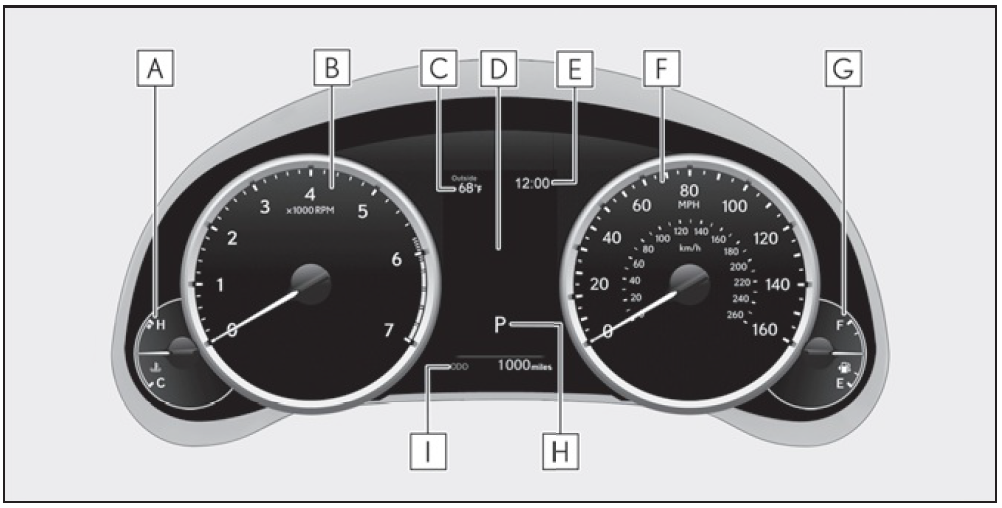 Locations of gauges and meters (except F SPORT models)
The units of measure may differ depending on the intended destination of the vehicle.
- Engine coolant temperature gauge
Displays the engine coolant temperature - Tachometer
Displays the engine speed in revolutions per minute - Outside temperature
Displays the outside temperature within the range of -40°F (-40°C) to 122°F (50°C) - Multi-information display
Presents the driver with a variety of vehicle data
Displays warning messages if a malfunction occurs - Clock
Time displayed is linked to the analog clock on the center panel. - Speedometer
- Fuel gauge
Displays the quantity of fuel remaining in the tank - Shift position and gear position
- Odometer and trip meter display
Locations of gauges and meters (F SPORT models)
Main meter in center position (IS350 AWD/IS350/IS300 AWD/IS300)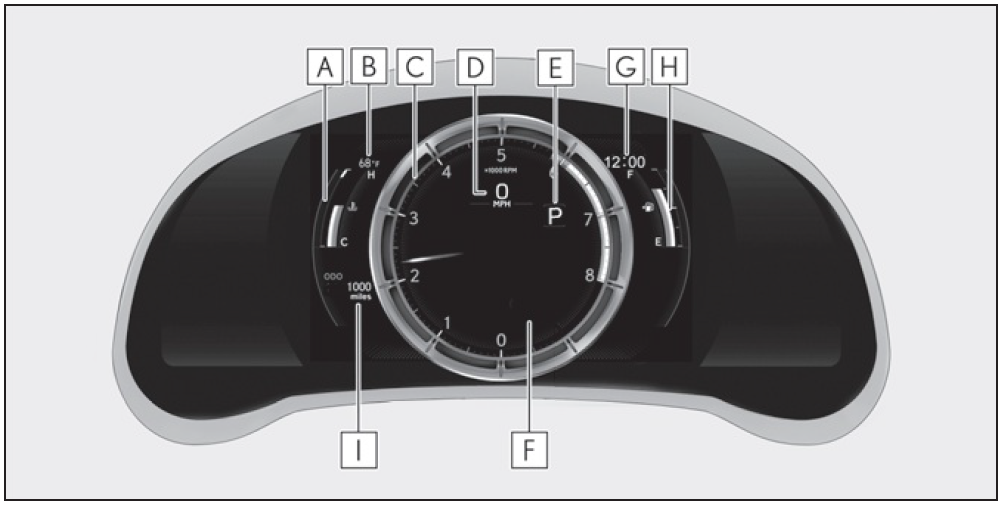
The units of measure may differ depending on the intended destination of the vehicle.
- Engine coolant temperature gauge
Displays the engine coolant temperature - Outside temperature
Displays the outside temperature within the range of -40°F (-40°C) to 122°F (50°C) - Tachometer
Displays the engine speed in revolutions per minute When sport mode is selected for the driving mode, the periphery of the tachometer will change color and the scale of the tachometer will be emphasized. - Speedometer
- Shift position and gear position
- Multi-information display
Presents the driver with a variety of vehicle data Displays warning messages if a malfunction occurs
- Clock
Time displayed is linked to the analog clock on the center panel. - Fuel gauge
Displays the quantity of fuel remaining in the tank - Odometer and trip meter display
Main meter in center position (IS500) The units of measure may differ depending on the intended destination of the vehicle.
- Engine oil temperature gauge Displays the engine oil temperature
- Outside temperature Displays the outside temperature within the range of -40°F (-40°C) to 122°F (50°C)
- Tachometer Displays the engine speed in revolutions per minute
When sport mode is selected for the driving mode, the periphery of the tachometer will change color and the scale of the tachometer will be emphasized. - Speedometer
- Shift position and gear position
- Clock
Time displayed is linked to the analog clock on the center panel. (P.261) - Engine coolant temperature gauge Displays the engine coolant temperature
- Odometer and trip meter display
- Fuel gauge Displays the quantity of fuel remaining in the tank
- Multi-information display
Presents the driver with a variety of vehicle data Displays warning messages if a malfunction occurs
Main meter moved to the right The units of measure may differ depending on the intended destination of the vehicle.
- Outside temperature
Displays the outside temperature within the range of -40°F (-40°C) to 122°F (50°C) - Clock
Time displayed is linked to the analog clock on the center panel. - Tachometer
Displays the engine speed in revolutions per minute When sport mode is selected for the driving mode, the periphery of the tachometer will change color and the scale of the tachometer will be emphasized. - Speedometer
- Shift position and gear position
- Odometer and trip meter display
- Multi-information display
Presents the driver with a variety of vehicle data (P.76) Displays warning messages if a malfunction occurs (P.338)
- Engine coolant temperature gauge Displays the engine coolant temperature
- Fuel gauge
Displays the quantity of fuel remaining in the tank
Rev indicator (F SPORT models)
When the engine speed reaches a set speed, a ring-shaped indicator will be displayed on the tachometer.
Rev peak (F SPORT models)
The engine speed reaches or exceeds 5000 rpm, an afterimage of the tachometer will be displayed at the highest engine speed for approxi-mately 0.5 seconds.
The meters and display illuminate when
The engine switch is in IGNITION ON mode.
Variable red zone (IS500)
To help protect the engine, the engine speed is controlled by starting the red zone of the tachometer at different engine speeds ranging from 3700 rpm to 7300 rpm depending on the engine coolant tem-perature. Before driving under extremely high load conditions, make sure to suffi-ciently warm up the engine.
Outside temperature display
- In the following situations, the correct outside temperature may not be displayed, or the display may take longer than normal to change:
- When stopped, or driving at low speeds (less than 12 mph [20 km/h])
- When the outside temperature has changed suddenly (at the entrance/exit of a garage, tunnel, etc.)
- When “_ _”or “E” is displayed, the system may be malfunctioning. Take your vehicle to your Lexus dealer.
Pop-up display
- In some situations, such as when a switch operation is performed, a pop-up display will be temporarily displayed on the multi-information display or the odometer/ trip meter screen (F SPORT models).
- Some pop-up displays can be set on/off.
Liquid crystal display
Small spots or light spots may appear on the display. This phenomenon is characteristic of liquid crystal displays, and there is no problem continuing to use the display.
Customization
The meter display can be customized on the multi-information display.
WARNING
The information display at low temperatures Allow the interior of the vehicle to warm up before using the liquid crystal infor-mation display. At extremely low tem-peratures, the information display monitor may respond slowly, and display changes may be delayed. For example, there is a lag between the driver’s shifting and the new gear number appearing on the display. This lag could cause the driver to downshift again, causing rapid and excessive engine brak-ing and possibly an accident resulting in death or injury.
NOTICE
To prevent damage to the engine and its components
- Do not let the indicator needle of the tachometer enter the red zone, which indicates the maximum engine speed.
- The engine may be overheating if the engine coolant temperature gauge is in the red zone (H). In this case, immediately stop the vehicle in a safe place, and check the engine after it has cooled completely.
Changing the main meter location (F SPORT models)
Moves between center and right-side positions.
Odometer and trip meter display
Display items
Odometer
Displays the total distance the vehicle has been driven.
Trip meter A/trip meter B
Displays the distance the vehicle has been driven since the meter was last reset. Trip meters A and B can be used to record and display different distances independently.
Distance until next engine oil change
Displays the distance the vehicle can be driven until an oil change is necessary.
Changing the display
Each time the “ODO TRIP” switch is pressed, the displayed item will be changed. When the trip meter is displayed, pressing and holding the switch will reset the trip meter.
Pop-up display
Distance until the next engine oil change will displayed when a warning
message indicating that oil maintenance should be performed soon or is required is displayed.
Changing the instrument panel light brightness
The brightness of the instrument panel lights can be adjusted.
- Darker
- Brighter
Brightness of the meters (day mode and night mode)
The brightness of the meters changes between day mode and night mode.
- Day mode: When the tail lights are off or when the tail lights are on but the surrounding area is bright
- Night mode: When the tail lights are on
Multi-information display
The multi-information display presents the driver with a variety of vehicle data.
Display and menu icons
Display (except F SPORT models)
By selecting menu icons on the multi-information display, a variety of
driving-related information can be displayed. The multi-information display can also be used to change display settings and other vehicle settings. Warning or advice pop-up displays are also displayed in certain situations.
Display (F SPORT models)
Main meter in center position
The multi-information display presents the driver with a variety of driving- related information. Warning or advice pop-up displays are also displayed in certain situations
Main meter moved to the right
By selecting menu icons on the multi-information display, a variety of
driving-related information can be displayed. The multi-information display can also be used to change display settings and other vehicle settings. Warning or advice pop-up displays are also displayed in certain situations.
Menu icons
Select a menu icon to display its content. F SPORT models: The menu icons can be displayed when the main meter is moved to the right.

 Navigation system-linked display (if equipped)
 Audio system-linked display

 Warning message display
 Settings display
Liquid crystal display
WARNING
Caution for use while driving
- When operating the multi-information display while driving, pay extra attention to the safety of the area around the vehicle.
- Do not look continuously at the multi-information display while driving as you may fail to see pedestrians, objects on the road, etc. ahead of the vehicle.
The information display at low temperatures
Changing the meter display
The multi-information display is operated using the meter control switches
- Select menu icons / : Change displayed content, scroll up/down the screen and move the cursor up/down
- Press: Enter/Set Press and hold: Reset
Except F SPORT models
- Display the top screen and return to the previous screen Press and hold : Register current screen as the top screen
- Call sending/receiving and history display
Linked with the hands-free system, sending or receiving call is displayed. For details regarding the hands-free system, refer to the “NAVIGATION AND MULTIMEDIA SYSTEM OWNER’S MANUAL”.
F SPORT models
- Move the main meter and return to the previous screen
- Call sending/receiving and history display
Linked with the hands-free system, sending or receiving call is displayed. For details regarding the hands-free system, refer to the “NAVIGATION AND MULTIMEDIA SYSTEM OWNER’S MANUAL
2023 – 2024 Lexus IS Specs, Price, Features, Mileage and Review
Registering a top screen (except F SPORT models)
The displayed top screen can be changed to a registered screen of your
choice. To register a screen as the top screen, display the desired screen and press and hold
Content of driving information
Display items (except F SPORT models)
Press or of the meter control switch and select . Then press or to display the following items:
- Drive information 1
- Drive information 2
- Drive information 3
- Eco Driving Indicator
- Speedometer display
- Tire pressure (P.299)
- Gear Position
- Display off
Display items (F SPORT models)
Main meter in center position Press or of the meter control switch to display the following items:
- Drive information 1
- Drive information 2
- Tire pressure (P.299)
- Gear Position
- Units
- Display off
Main meter moved to the right
Press or of the meter control switch and select . Then press or to display the following items:
- Drive information 1
- Drive information 2
- Eco Driving Indicator
- Boost gauge/engine oil temperature gauge/engine oil pressure gauge (if equipped)
- G-force
- Gear Position
- Tire pressure (P.299)
- Display off
Drive information 1/Drive information 2/Drive information 3
Displays drive information such as the following:
Use the displayed values as a reference only.
- Drive information 1
- Current fuel consumption
- Average fuel economy (after reset)
- Drive information 2
- Distance (driving range)
- Average vehicle speed (after reset)
- Drive information 3*
- Average fuel economy (after refuel)
- Elapsed time (after start)
Except F SPORT models
Displayed items (listed below) can be changed on . (P.81)
- Current fuel consumption Bar type:
Displays instantaneous current fuel consumption - Average fuel economy After reset: Displays average fuel consumption since the display was reset*1 After start: Displays average fuel consumption since engine start After refuel: Displays average fuel consumption since refuel
- Average vehicle speed After reset:
Displays average vehicle speed since the display was reset*1 After start: Displays average vehicle speed since engine start - Elapsed time After reset:
Displays elapsed time since the display was reset*1 After start: Displays elapsed time since engine start - Distance
Driving range: Displays driving range with remaining fuel*2, 3
After start: Displays the distance driven since engine start - Other
Blank: No item
- To reset, display the desired item and press and hold of the meter control switch.
- This distance is computed based on your average fuel consumption. As a result, the actual distance that can be driven may differ from that displayed.
- When only a small amount of fuel is added to the tank, the display may not be updated. When refueling, turn the engine switch off. If the vehicle is refueled without turning the engine switch off, the display may not be updated.
Eco Driving Indicator
- Eco Driving Indicator Light During Eco-friendly acceleration (Eco
driving), the Eco Driving Indicator Light will turn on. When the acceleration exceeds the Zone of Eco driving, or when the vehicle is stopped, the light turns off. - Eco Driving Indicator Zone Display Suggests the Zone of Eco driving with current
- Eco driving ratio based on acceleration. Eco driving ratio based on acceleration If the acceleration exceeds the Zone of Eco driving, the right side of the Eco Driving Indicator Zone Display will illuminate. At this time, the Eco Driving Indicator Light will turn off.
- Zone of Eco driving
Speedometer (except F SPORT models)
Displays the vehicle speed.
Boost gauge/engine oil temperature gauge/engine oil pressure
gauge (if equipped)*
Boost gauge
Displays the boost pressure. The display will change color if the specified pressure is exceeded.
Engine oil temperature gauge
Displays the engine oil temperature. The display will flash if the engine oil temperature exceeds 284 °F (140 °C).
Engine oil pressure gauge
Displays the engine oil pressure. A buzzer will sound and warning message will be displayed if the engine oil pressure becomes low. (P.340) This display is intended for use as a guideline. Depending on factors such as the road surface condition, temperature and vehicle speed, the display may not show the actual condition of the vehicle.
For F SPORT models, this item is not available when the main meter is in the center position.
G-force (F SPORT models)*
Displays lateral G-forces on the vehicle.
- Acceleration G-force on the vehicle
- Current G-force value (analyzed value of front/rear and left/right
G-forces) - Record of the maximum G-forces This display is intended for use as a guideline. Depending on factors such as the road surface condition, temperature and vehicle speed, the display may not show the actual condition of the vehicle.
- Resetting the record of maximum G-forces Press and hold of the meter control switch to reset the record.
- Peak hold function If lateral G-forces of 0.5 G or greater are generated, the G-force value display will turn amber and be held for 2 seconds.
For F SPORT models, this item is not available when the main meter is in the center position.
Gear Position
Displays the current shift range or gear position when the shift position is in D or M.
Eco Driving Indicator
Eco Driving Indicator will not operate under the following conditions:
- The shift lever is in position other than D.
- A paddle shift switch is operated.
- Neither normal mode nor Eco drive mode is selected.
- The vehicle speed is approximately 80 mph (130 km/h) or higher.
G-force display
The G-force values may not be zero even when the vehicle is parked, such as when it is parked on an incline.
Navigation system-linked display (if equipped)
Select to display the following navigation system-linked information.
- Route guidance to destination
- Compass display (heading-up display)
Audio system-linked display
The operating conditions of the audio system can be displayed on the
multi-information display.
Driving support system information display
Select to display the operational status of the following systems:
- LTA (Lane Tracing Assist)
- RSA (Road Sign Assist) (if equipped)
- Dynamic radar cruise control with full-speed range
Settings display
Meter display settings that can be changed
- Language
Select to change the language displayed. - Units
Select to change the units of measure displayed. - Speedometer display (except F SPORT models) Select to set the display of the speedometer to digital/analog/both digital and analog.
- Drive information 1/Drive information 2/Drive information 3
Select to select up to 2 items that will be displayed on each Drive information screen (Drive information 1 screen, Drive information 2 screen and Drive information 3 screen) respectively. - Clock
Select to switch between 12-hour display and 24-hour display. - Pop-up display
Select to enable/disable pop-up displays for each relevant system. - Accent color
Select to change the accent color on the screen, such as the cursor color. - Rev indicator (F SPORT models)
- Select to enable/disable the rev indicator.
- Select to set the engine speed at which the rev indicator (amber) will begin to be displayed.
- Rev peak (F SPORT models)
Select to enable/disable the rev peak. - Eco Driving Indicator Light
Select to enable/disable the Eco Driving Indicator Light. - Default setting
Select to reset the meter display settings to the default setting.
Vehicle functions and settings that can be changed
Suspension of the settings display
- Some settings cannot be changed while driving. When changing settings, park the vehicle in a safe place.
- If a warning message is displayed, operation of the settings display will be suspended.
WARNING
Cautions during setting up the display
As the engine needs to be running during setting up the display, ensure that the vehicle is parked in a place with adequate ventilation. In a closed area such as a garage, exhaust gases including harmful carbon monoxide (CO) may collect and enter the vehicle. This may lead to death or a serious health hazard.
NOTICE
During setting up the display
To prevent battery discharge, ensure that the engine is running while setting up the display features.
Fuel consumption information
Fuel consumption information can be displayed on the Center Display.
Vehicles with a navigation system (10.3-inch display): The fuel consumption information can be displayed and operated on the side display.
System components
- Center Display
- “MENU” button
- Touchpad
Consumption
Trip information
Press the “MENU” button on the Remote Touch, then select on the
menu screen. If a screen other than “Trip Information” is displayed, select “Trip Information”. This system can also be operated by
the touch screen.
- Resetting the consumption data
- Fuel consumption in the past 15 minutes
- Current fuel consumption
- Average vehicle speed since the engine was started.
- Elapsed time since the engine was started.
- Cruising range
Average fuel consumption for the past 15 minutes is divided by color into past averages and averages attained since the engine switch was last turned to IGNITION ON mode. Use the displayed average fuel consumption as a reference. The image is an example only, and may vary slightly from actual conditions.
History
Press the “MENU” button on the Remote Touch, then select on the menu screen. If a screen other than “History” is displayed, select “History”. This system can also be operated by the touch screen.
- Best recorded fuel consumption
- Latest fuel consumption
- Previous fuel consumption record
- Resetting the history data
- Updating the latest fuel consumption data
The average fuel consumption history is divided by color into past averages and the average fuel consumption since the last updated. Use the displayed average fuel consumption as a reference. The image is an example only, and may vary slightly from actual conditions.
Updating the history data
Update the latest fuel consumption by selecting “Update” to measure the current fuel consumption again.
Resetting the data
The fuel consumption data can be deleted by selecting “Clear”.
Cruising range
Displays the estimated maximum distance that can be driven with the quantity of fuel remaining. This distance is computed based on your
average fuel consumption. As a result, the actual distance that can be driven may differ from that displayed.
Using the side display (vehicles with a navigation system [10.3-inch display])
Vehicle information can be displayed on the side display (P.242), then select or to select the desired screen. The image is an example only, and may vary slightly from actual conditions.
Trip information (type A)
Displays the average fuel consumption for the past 10 minutes in 1 minute intervals, as well as the cruising range.
Trip information (type B)
Displays the cruising range, average fuel consumption and the amount of time elapsed since the engine was started.
History
Displays the average fuel consumption and highest fuel consumption.
Useful Links:
2023 – 2024 Lexus IS Specs, Price, Features, Mileage and Review
2025 Lexus IS Keys and Smart Key User Guide
2025 Lexus IS Theft-Alarm System User Guide