


2023 Nissan KICKS Display Instrument Panel | How to use
This tutorial covers the 2023 Nissan Kicks display instrument panel, its features, and how to use its settings to improve your driving experience and track vehicle information. 2023 Nissan Kicks Specs, Price, Features and Mileage (Brochure)Video: 2023 Nissan Kicks Dashboard Indicators
INSTRUMENT PANEL
METERS AND GAUGES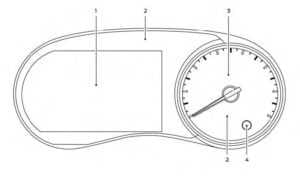
-
Tachometer Vehicle information display Odometer Twin trip odometer Fuel gauge
- Warning and indicator lights
- Speedometer
- Trip reset switch Instrument brightness control knob

Type B (if so equipped)
- Tachometer
- Trip computer Odometer Twin trip odometer
- Speedometer
- Trip reset switch Instrument brightness control knob
- Warning and indicator lights
SPEEDOMETER AND ODOMETER
This vehicle is equipped with a speedometer and odometer. The speedometer is located on the right side the meter cluster. The odometer is located within the vehicle information display (Type A—if so equipped) or the trip computer (Type B—if so equipped) to the left of the speedometer. Speedometer
The speedometer indicates vehicle speed.
Speedometer
The speedometer indicates vehicle speed.
 Type B (if so equipped)
Changing the display
Push the TRIP RESET switch 2O on the right side of the instrument panel to change the display as follows:
Trip → Trip → Odometer Mileage → Trip
Resetting the trip odometer
Pushing the TRIP RESET switchO2 for more
than 1 second resets the currently displayed trip odometer to zero.
Average fuel economy information is also available. For additional information, see “Trip computer”
Type B (if so equipped)
Changing the display
Push the TRIP RESET switch 2O on the right side of the instrument panel to change the display as follows:
Trip → Trip → Odometer Mileage → Trip
Resetting the trip odometer
Pushing the TRIP RESET switchO2 for more
than 1 second resets the currently displayed trip odometer to zero.
Average fuel economy information is also available. For additional information, see “Trip computer”


Type A (if so equipped)
 Type B (if so equipped)
: The tachometer is located on the left side of the meter cluster.
CAUTION
When engine speed approaches the red zone, shift to a higher gear or reduce engine speed. Operating the engine in the red zone may cause serious engine damage.
Type B (if so equipped)
Type B (if so equipped): The tachometer is located on the left side of the meter cluster.
CAUTION
When engine speed approaches the red zone, shift to a higher gear or reduce engine speed. Operating the engine in the red zone may cause serious engine damage.

Type A (if so equipped)
 Type B (if so equipped)
: The low fuel warning light illuminates when the amount of fuel in the tank is getting low.
Refill the fuel tank before the gauge registers 0 (Empty).
The indicates that the fuel-filler door is located on the driver’s side of the vehicle.
CAUTION
Type B (if so equipped)
Type B (if so equipped): The low fuel warning light illuminates when the amount of fuel in the tank is getting low.
Refill the fuel tank before the gauge registers 0 (Empty).
The indicates that the fuel-filler door is located on the driver’s side of the vehicle.
CAUTION
- If the vehicle runs out of fuel, the Malfunction Indicator Light (MIL) may come on. Refuel as soon as possible. After a few driving trips, the light should turn off. If the light remains on after a few driving trips, have the vehicle inspected. It is recommended that you visit a NISSAN dealer for this service
- For additional information, see “Malfunction Indicator Light (MIL)”
DISTANCE TO EMPTY (DTE)
Displays the estimated distance the vehicle can be driven before refueling. The value is calculated based on recent fuel economy, the amount of fuel remaining in the fuel tank, and the actual fuel consumption. Changes in driving patterns or conditions can cause the DTE value to vary. As a result, the value displayed may differ from the actual distance that can be driven. DTE display will change to “—” when the fuel level in the tank is getting low, prior to the fuel gauge reaching 0 (Empty). NOTE:- The DTE value after refill is estimated based on recent fuel economy and amount of fuel added.
-
If a small amount of fuel is added, or the ignition is on during refueling, the display may not be updated.
-
Conditions that affect the fuel economy will also affect the estimated DTE value (city/highway driving, idle time, remote start time, terrain, seasonal weather, added vehicle weight, added deflectors, roof racks, etc.).
 ECO DRIVE REPORT
When the ignition switch is in the OFF position, ECO management display appears.
ECO DRIVE REPORT
When the ignition switch is in the OFF position, ECO management display appears.
- Previous 5 times (History)
- Current fuel economy
- Best fuel economy
- The average fuel economy for the previous five times will be displayed.
- The average fuel economy since the last reset will be displayed.
- The best fuel economy of the past history will be displayed. The ECO drive report can be set to be ON or OFF.