


2023 Nissan Murano Cruise Control Owner’s Manual
The 2023 Nissan Murano has innovative cruise control technology that makes driving easy and adaptable. For increased comfort, it has lane-keeping assistance, speed adjustment, and adaptive cruise control.
2023 Nissan Murano Specs, Price, Features, Mileage (Brochure)
NISSAN CRUISE CONTROL (if so equipped) GUIDE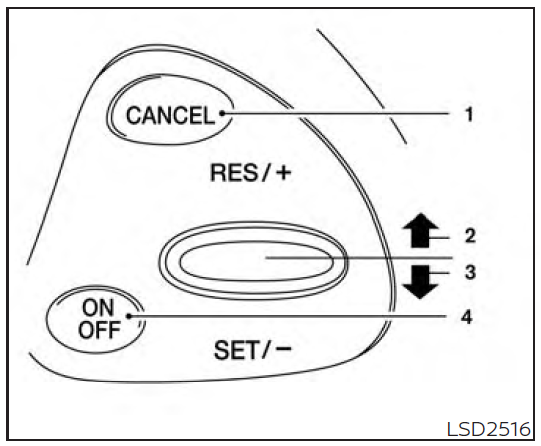
PRECAUTIONS ON CRUISE CONTROL
- CANCEL switch
- RES/+ switch
- SET/- switch
- ON/OFF switch
- If the cruise control system malfunctions, it cancels automatically. The indica-tor in the vehicle information display then blinks to warn the driver.
- If the indicator blinks, turn the cruise control off and have the system checked. It is recommended that you visit a NISSAN dealer for this service.
- The indicator may blink when the ON/OFF switch is turned on while push-ing the RES/+ switch, SET/- switch, or CANCEL switch. To properly set the cruise control system, use the following procedures.
WARNING
Do not use the cruise control when driv-ing under the following conditions:
- When it is not possible to keep the vehicle at a set speed.
- In heavy traffic or in traffic that varies in speed.
- On winding or hilly roads.
- On slippery roads (rain, snow, ice, etc.).
- In very windy areas.
Doing so could cause a loss of vehicle control and result in an accident.
CRUISE CONTROL OPERATIONS
The cruise control allows driving at a speed between 25 – 89 mph (40 – 144 km/h) with-out keeping your foot on the accelerator pedal.
To turn on the cruise control, push the ON/OFF switch on. The indicator in the vehicle information display will illumi-nate. If the Cruise Control Alerts are en-abled in the Driving Aids menu, then the “Cruise ON: Press SET to engage speed control” message will appear in the vehicle information display.
This message will disappear after about 6 seconds, or can be dismissed by pushing the OK button. Cruise control status will continue to display in the upper right cor-ner of the vehicle information display while the system is on.
To set cruising speed, accelerate the ve-hicle to the desired speed, push the SET/–switch and release it. Take your foot off the accelerator pedal. Your vehicle maintains the set speed.
If the Cruise Control Alerts are enabled in the Driving Aids menu, then the “Target Speed SET. Press + or – to adjust” message will appear in the vehicle information dis-play when the SET/– switch is pushed. This message will disappear after about 6 sec-onds, or can be dismissed by pushing the OK button. Cruise control status will con-tinue to display in the upper right corner of the vehicle information display while the system is on.
- To pass another vehicle, depress the ac-celerator pedal. When you release the pedal, the vehicle returns to the previ-ously set speed.
- The vehicle may not maintain the set speed when going up or down steep hills. If this happens, drive without the cruise control.
To cancel the preset speed, use one of the following three methods:
- Push the CANCEL switch.
- Tap the brake pedal.
- Push the ON/OFF switch off. The indicator in the vehicle information dis-play goes out.
The cruise control is automatically can-celed if:
- You depress the brake pedal while push-ing the RES/+ or SET/– switch. The preset speed is deleted from memory.
- The vehicle slows down more than 8 mph (13 km/h) below the set speed.
- You move the shift lever to N (Neutral).
If the Cruise Control Alerts are enabled in the Driving Aids menu, the “Cruise ON: Press SET to engage speed control” message will reappear in the vehicle information display to let you know the cruise control system is still on if you set the target speed again.
To reset at a faster cruising speed, use one of the following three methods:
- Depress the accelerator pedal. When the vehicle attains the desired speed, push and release the SET/– switch.
- Push and hold the RES/+ switch. When the vehicle attains the speed you desire, release the switch.
- Push and release the RES/+ switch. Each time you do this, the set speed increases by about 1 mph (1.6 km/h).
To reset at a slower cruising speed, use one of the following three methods:
- Lightly tap the brake pedal. When the ve-hicle attains the desired speed, push the SET/– switch and release it.
- Push and hold the SET/– switch. Release the switch when the vehicle slows to the desired speed.
- Push and release the SET/– switch. Each time you do this, the set speed decreases by about 1 mph (1.6 km/h).
2023 Nissan Murano Specs, Price, Features, Mileage (Brochure)
To resume the preset speed, push and release the RES/+ switch. The vehicle re-turns to the last set cruising speed when the vehicle speed is over 25 mph (40 km/h).
To turn off the cruise control, use one of the following three methods:
- Push the CANCEL switch.
- Tap the brake pedal.
- Push the ON/OFF switch off. The indicator in the vehicle information dis-play goes out.
FAQs
The 2023 Nissan Murano features an advanced cruise control system designed to maintain a set speed without requiring constant input from the driver.
To activate cruise control, press the cruise control switch located on the steering wheel. Then, use the + or – buttons to set your desired speed.
You can adjust the set speed using the + or – buttons on the cruise control switch.
The 2023 Nissan Murano comes with an adaptive cruise control system that maintains a set speed and adjusts it based on the distance to the vehicle ahead.
Use the distance control button on the cruise control switch to select your preferred distance from the vehicle ahead.
Useful Links
View Full PDF: Nissan MURANO 2023 User Guide | Auto User Guide
2023 Nissan Murano Specs, Price, Features, Mileage (Brochure)