

2025 Renault Master Instrument Panel User Guide
This blog provides a comprehensive introduction to the 2025 Renault Master instrument panel, emphasising key controls and displays for confident driving. Understand each feature to increase safety and convenience.
Video: Renault Master Warning Lights and Indicator
Displays and indicators
Instrument panel A
The presence and operation of the display and indicators DEPENDS ON THE LEVEL OF EQUIPMENT AND THE COUNTRY
Rev counter 1 (rpm x 1000)
Automatic gearbox display 2
Speedometers 3 and, depending on the vehicle, 4
(kilometres or miles per hour)
Control your speed according to the speedometer 3 or 4 . In case of a difference between the speedometers, refer to the approved speedometer 3 and consult an approved dealer.
Trip computer 5
Fuel gauge 6
The number of squares lit shows the fuel level. When it is at minimum, the squares disappear and the low fuel level warning light comes on, depending on the vehicle.
Instrument panel B
The presence and operation of the display and indicators DEPENDS ON THE LEVEL OF EQUIPMENT AND THE COUNTRY.

Selection of views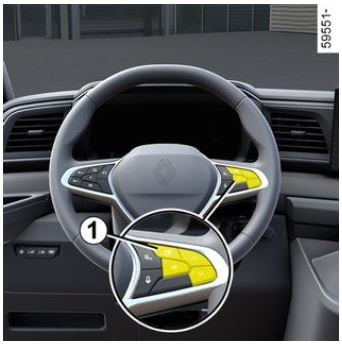 Depending on the vehicle, use the control 1 to browse and select the various view on the instrument panel B . Several views are proposed:
- Charging view: only while the vehicle is charging, displays the vehicle range, battery percentage and remaining charging time;
- ADAS view: displays the speed and the active driving aids in full screen and the information area on the instrument panel;
- Power view: displays the speed, active driving aids and power-meter on the instrument panel;
- Minimum view: displays only essential information, the speed, active driving aids and the information area on the instrument panel.
Excessive speed audible alarm
Depending on the vehicle and country, the  warning light is displayed and a beep sounds. This beep sounds as soon as the vehicle is travelling at over 75 mph (120 km/h). This warning light remains lit for as long as the vehicle is travelling at over 74 mph (120 km/h).
Central gauge indicator lights
2 Speedometer
The vehicle speed is limited to approximately 75 mph (120 km/h) or, for combustion engine versions, approximately 93 mph (150 km/h) or 99 mph (160 km/h), depending on the vehicle.
5 Total mileage recorder
6 Trip computer zone
7 Multimedia information
Depending on the vehicle, you can display information from the multimedia screen (telephone, navigation, etc.). Please refer to the multimedia instructions for more information.
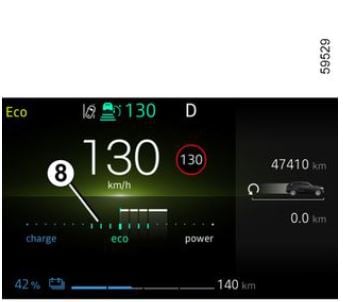 Charge meter
Left-hand gauge indicator lights
Warning light
Tyre under-inflation warning light
12 Warning light forairbag
Right-hand gauge indicators Right-hand direction indicator
Parking brake warning light
Hands off steering wheel” detection warning light
Urgent stop warning light
Instrument panel in miles
Vehicles not fitted with a multimedia screen instrument panel A

- With the ignition off, press the switch 1 as many times as required to reach the vehicle tab 5 ;
- press control 2 or 3 repeatedly to reach the “Settings” menu, press the switch 4 ” OK “;
- repeat the same operation to reach “DASHBOARD”, then “Units”.
Vehicles not fitted with a multimedia screen instrument panel B

- With the ignition off, press the switch 1 as many times as required to reach the “Settings” world 6 ;
- press control 2 or 3 repeatedly to reach “Vehicle setting”, then press switch 4 “OK”;
- press control 2 or 3 repeatedly to reach “DASHBOARD”, then press switch 4 “OK”;
- press control 2 or 3 repeatedly to reach “Unit: km/h ” (or “Unit: mph ” in the opposite case), press the switch 4 “OK”.
Vehicles fitted with a multimedia screen.
Please refer to the multimedia instructions to select the audio system.
Note: in both cases, once the battery is switched off, the on-board computer automatically returns to the original unit of measurement. To return to the previous mode, repeat the same operation. Please refer to the multimedia instructions for more information.
Vehicle settings personalisation menu
Vehicles fitted with a multimedia screen 1
Access the settings menu
Refer to the various multimedia instructions for information on accessing the settings. Select a menu then the function to be modified (the display depends on the vehicle equipment and country):
- “Driving”:
- Direction indicator volume;
- Free-wheel;
- “Access”:
- Unlocking the driver’s door;
- Lock doors during driving;
- Opening/closing in hands-free mode;
- Remote locking sound;
- Silent mode;
- Automatic locking;
- Switching between Access/Secure mode.
- “Wiping and lighting”:
- Follow-me-home lighting;
- Wiping in reverse;
- Automatic front wiping;
- Wipe after wash.
- “Welcome”:
- Exterior welcome;
- Interior welcome;
- Courtesy light auto mode Depending on the function, select:
- “ON” or “OFF” to activate or deactivate it,
- a setting to adjust the time during which the lights are switched on (e.g. for the “Followmehome lighting” function).
Please refer to the multimedia instructions for further information.
For safety reasons, carry out any adjustments while the vehicle is stationary.
Useful Links:
2023 RENAULT MASTER Specs, Price, Features, Mileage and Review
2025 Renault Master Warning Lights and Indicator User Guide
2025 Renault Master Seats and Seat Belts User Guide