
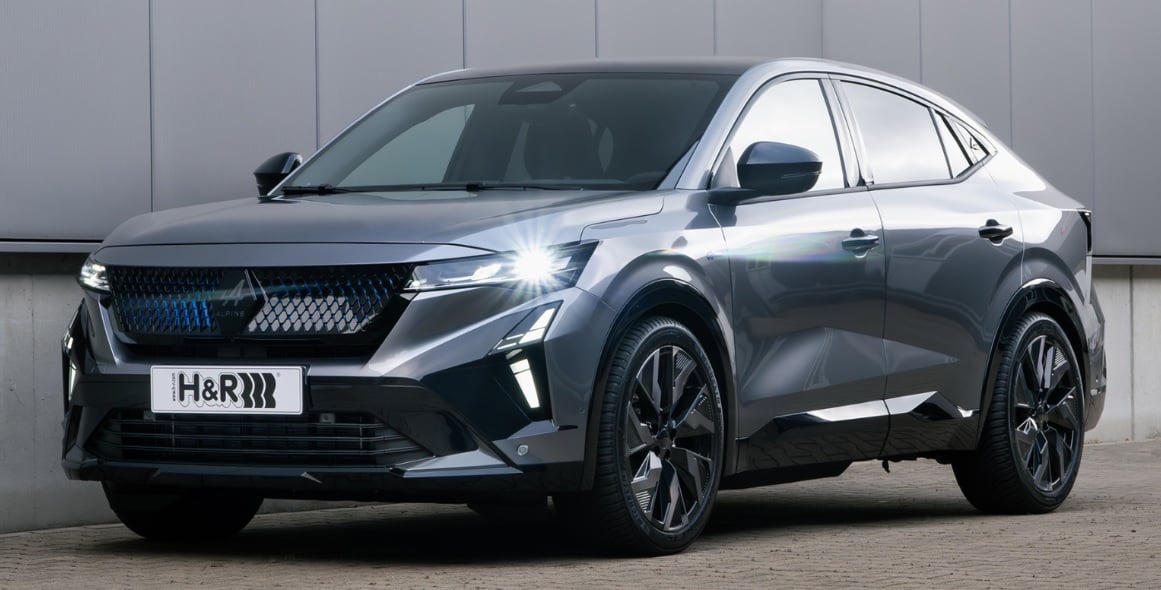

2025 Renault Rafale Displays User Guide
This blog offers a comprehensive overview of the 2025 Renault Rafale, highlighting key features and essential information that drivers need. Understand how each display enhances your driving experience through intuitive visuals and clever functions.
Video: Renault Rafale Warning Lights and Indicator
Displays and indicators
Instrument panel lights up when the driver’s door is opened. In some cases, the appear-ance of a warning light is accompanied by a message.
Depending on the vehicle, you can customise your instrument panel A with the content and colours of your choice.
Selection of views
Depending on the vehicle, several views are available on the instrument panel. To select a view press as many times as necessary on the control 1 to scroll through the various views on the instrument panel A until you reach the desired view.
All of the available views display the following essential information on the instrument panel:
- speedometer;
- the information on the activated dri-ving aids;
- information area.
The “Driving aids” view displays the essential information on the instrument panel with that of the active driving aids in full screen.
The “Classic” view displays the es-sential information on the instrument panel and, depending on the vehicle, the power meter.
The “Navigation” view displays the essential information and the road map duplicated from the multimedia system on the entire instrument panel.
Realistic view B (depending on the vehicle)
Note: the system only recognises ve-hicles in the car, lorry and motorbike categories.
The “Minimal” view displays only the essential information on the dash-board.
Information display
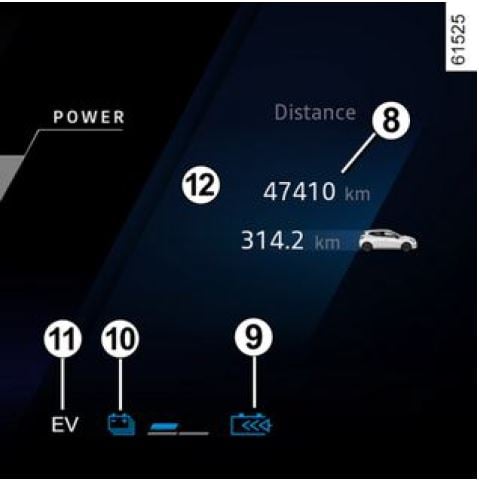 Speedometer 2 Information on driving aids 3 Estimated range with remaining fuel 4
Fuel gauge 5
If the level is at the minimum, the integrated
Information on navigation in progress 6 Power meter 7
The power meter gives the driver a re-al-time view of the vehicle’s energy Total mileage recorder 8
Regenerative braking level warning light 9
Traction battery charging level10
Electric operating mode warning light 11
It is displayed when only the traction battery is powering movement of the vehicle.
Information area 12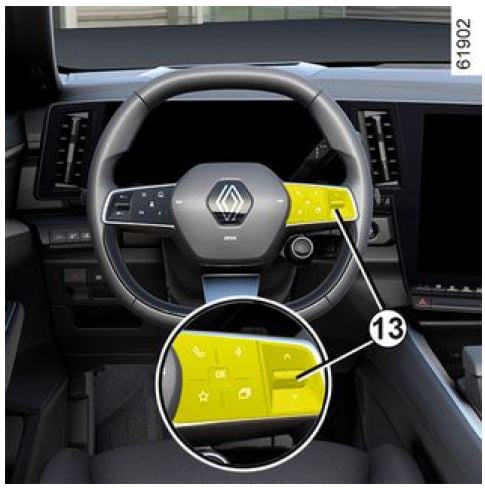
Depending on the vehicle, use the control 13 to browse and select the various on the instrument panel:
- trip computer information (mileage recorder, warning messages, etc.);
- multimedia information (compass, audio source currently playing, etc.);
Head-up display 18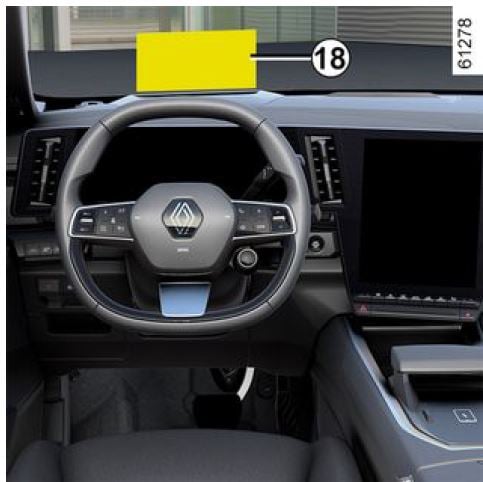 The display details driving and naviga-tion information from the instrument panel and the multimedia screen. The information is projected onto the wind-screen.
If fitted to the vehicle, this is activated when the engine is started and is de-activated when the engine is switched off.
Refer to the multimedia instructions to access the head-up display settings.
Adjusting the display information height
Depending on your driving position, you can raise or lower the information on the display. You can also slightly ro-tate the projected image.
Adjusting the display brightness
The brightness varies automatically according to the light level outside the vehicle. Once the lights are switched on, it is possible to manually adjust the brightness.
For safety reasons, carry out any adjustments while the vehicle is sta-tionary.
Do not use solvents, deter-gents or an abrasive cloth to clean the protective film. Only use a microfibre wipe.
The visibility of information may be affected by:
- the seat position;
- the presence of an object placed on the dashboard opening;
- the use of polarised spectacle lenses;
- extreme weather conditions (rain, snow, very strong sunlight, etc.).
Refer to the information displayed on the instru-ment panel in case of conflicting information between the panel and the head-up display/multimedia screen.
Instrument panel in miles (option to switch to km/h)
Choose between km/h or mph.
The speedometer and some of the dis-tance information displayed on the in-strument panel are converted.
To return to the previous mode, repeat the same operation.
Note: once the battery is switched off, the trip computer automatically returns to the original unit of measurement.
Please refer to the multimedia instruc-tions for more information.
To use certain driving aids, it is necessary to change the unit of measurement on the instrument panel in order to obtain the correct information when driving in a country where the speed units differ from those set as default on your vehicle.
For safety reasons, carry out any adjustments while the vehicle is sta-tionary.
Vehicle settings personalisation menu Depending on the vehicle equipment, this function allows you to activate/de-activate and adjust some of the vehicle’s functions.
Accessing the settings menu
With the vehicle stationary and the en-gine on, from the multimedia screen 1 select the “Vehicle” world, press the “Vehicle” menu then the “Exterior” tab to access the various settings.
Adjusting the settings
Select a tab then the function to be modified (the display depends on the vehicle equipment and country):
a) “Access”:
- “Automatic door locking while dri-ving”;
- “Locking/unlocking in hands-free mode”;
- “Access and starting by phone”;
b) “Welcome”:
- “Exterior lighting animation”;
- “Door opening welcome sound”;
- “Automatic fold-out of the door mir-rors”;
- “Automatic courtesy light”;
c) “Lighting”:
- “Adaptive lighting”;
- “Choice of driving side”;
d) “Wipers”:
- “Rear screen wiping in reverse”;
- “Automatic front wiping”;
Depending on the function, select: - “ON” or “OFF” to activate or deacti-vate it;
- a setting for the time the lights are switched on (e.g. for the “Follow-me-home lighting” function).
Please refer to the multimedia instruc-tions for further information.
For safety reasons, carry out any adjustments while the vehicle is sta-tionary.
“Favourites” function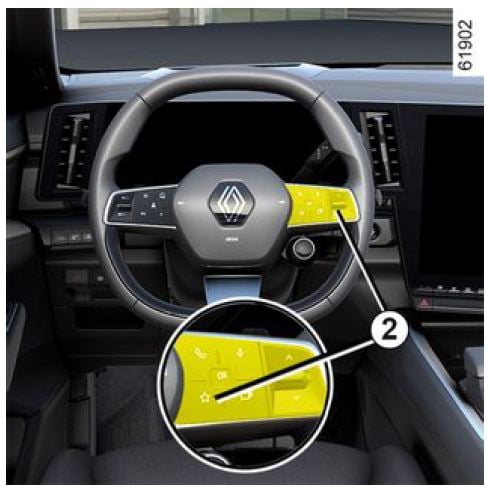 Depending on the vehicle, by pressing the steering wheel control 2 you can activate the following functions accord-ing to the stored user settings that you have previously defined:
- heated seats;
- heated steering wheel;
- setting selection (access, welcome, lighting, wiper, etc.);
- “Hands-free parking” function;
- ECO mode;
- 360° camera;
- HDC;
For more information on programming this function, please refer to the multi-media instructions.
For safety reasons, carry out any adjustments while the vehicle is sta-tionary.
Driving position (depending on the vehicle)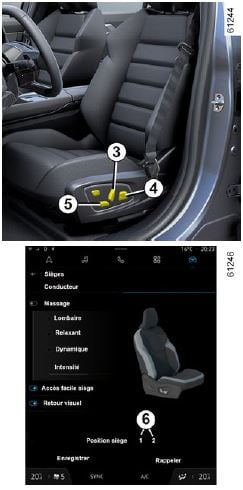
- by changing the user profile;
- by pressing the “Recall” button for the driver’s seat;
- by pressing the buttons 6 for the passenger seat.
The forward driving position includes the settings for:
- the seat base;
- the seatback;
- the door mirrors.
Storing your driving position
With the vehicle stationary and the en-gine on, from the multimedia screen 1 select the “Vehicle” world then the “Seats” menu.
- Adjust the driver’s and/or passenger’s.
- adjust the door mirrors.
Then press “Save” to store. Refer to the multimedia instructions for information on accessing the stored driving position.
Recalling the driving position
To access the stored driving position, select “Recall” on the multimedia screen. For more information on storing the driving position, please refer to the multimedia instructions.
Note: the driving position recall is in-terrupted if a seat adjustment button is pressed.
When the vehicle is started by press-ing and holding the engine start/stop button, the driving position is adjusted according to the last stored profile.
On vehicles that are equipped with this function, you can store and recall the driving position using the facial recognition system.
When recalling a posi-tion (memorisation, changing profile), make sure that no one is near the moving parts (in particular, in the rear seats).
For safety reasons, carry out any adjustments when the vehicle is stationary.
Clock and outdoor temperature Clock The time and outdoor temperature are displayed on the multimedia screen 1 . Please refer to the multimedia instruc-tions for further information.
Exterior temperature indicator Special feature:
When the outside temperature is be-tween -3°C and +3°C, the °C figures flash (this indicates a risk of ice forma-tion).
If the power supply is cut (battery disconnected, sup-ply wire cut, etc.), the clock must be reset. We recommend that you do not adjust these settings while dri-ving.
Exterior temperature indicator
As ice formation is relat-ed to climatic exposure, local air humidity and tempera-ture, the external temperature alone is not sufficient to detect ice.
Useful Links:
2023 RENAULT KANGOO Specs, Price, Features, Mileage and Review
2025 Renault Rafale Specifications User Guide
2025 Renault Rafale Light Bulbs User Guide