
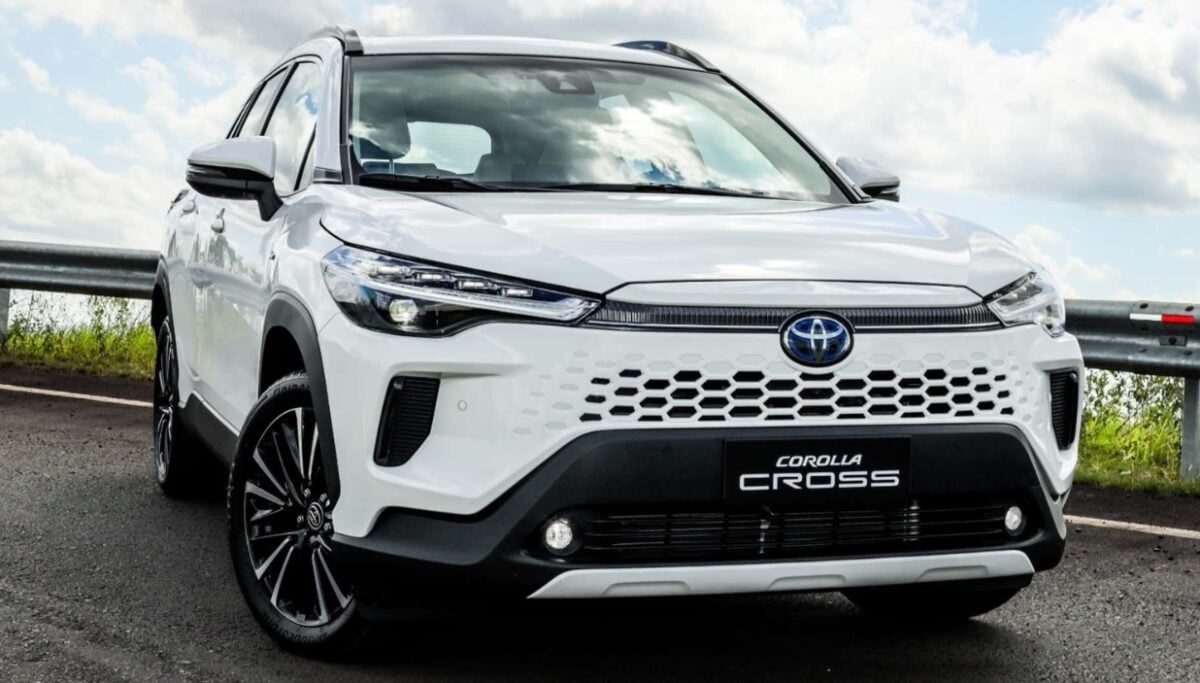

2026 Toyota Corolla Cross Instrument Cluster User Guide
This guide provides insights into the 2026 Toyota Corolla Cross instrument cluster, including detailed information on its operations and displays. Understand the important indicators, gauges, and driving data offered. This guide is designed to improve the driving experience by keeping drivers up to date on all of the features displayed on the digital cluster.
Video: 2026 Toyota Corolla Cross Dashboard Warning Indicators
Gauges and meters (7-inch display)
Meter display
Locations of gauges and meters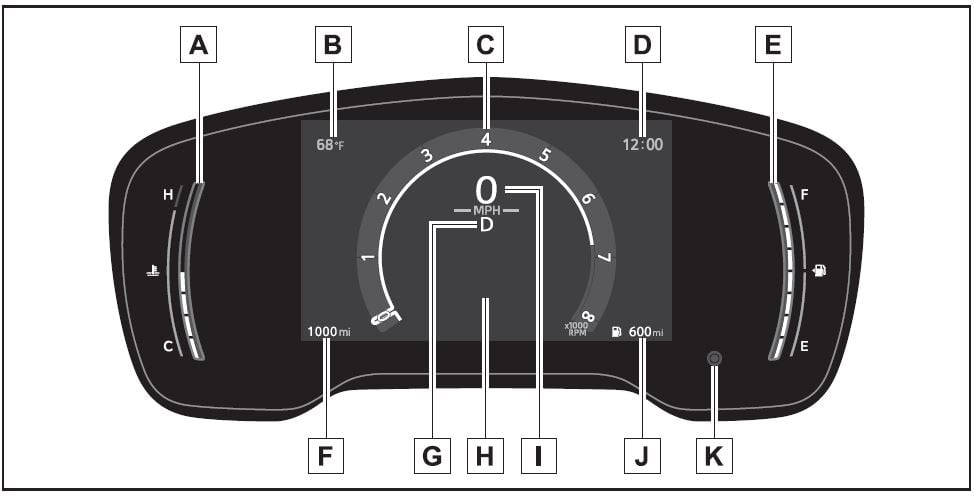
- Engine coolant temperature gauge Displays the engine coolant temperature
- Outside temperature
Displays the outside temperature within the range of -40°F (-40°C) to 140°F (60°C) - Analog speedometer/Tachometer
This setting can be changed on the setting screen. - Clock
- Fuel gauge
Displays the quantity of fuel remaining in the tank - Odometer and trip meter display
- Shift position indicator
- Multi-information display
Presents the driver with a variety of vehicle data
Displays warning messages if a malfunction occurs - Digital speedometer
- Driving range
- Display change button
Outside temperature display
- In the following situations, the cor-rect outside temperature may not be displayed, or the display may take longer than normal to change:
- When stopped, or driving at low speeds (less than 12 mph [20 km/h])
- When the outside temperature has changed suddenly (at the entrance/exit of a garage, tunnel, etc.)
- When “–” or “E” is displayed, the system may be malfunctioning. Take your vehicle to your Toyota dealer.
Driving range
- Use the displayed values as a ref-erence only.
- This distance is computed based on your average fuel consump-tion. As a result, the actual dis-tance that can be driven may differ from that displayed.
- When only a small amount of fuel is added to the tank, the display may not be updated. When refueling, turn the engine switch off. If the vehicle is refueled with-out turning the engine switch off, the display may not be updated.
Liquid crystal display
Customization
The gauges and meters can be cus-tomized in of the multi-informa-tion display.
WARNING
The information display at low temperatures
Allow the interior of the vehicle to warm up before using the liquid crystal information display. At extremely low temperatures, the information display monitor may respond slowly, and display changes may be delayed.
For example, there is a lag between the driver’s shifting and the new gear number appearing on the display. This lag could cause the driver to downshift again, causing rapid and exces-sive engine braking and possibly an accident resulting in death or injury.
NOTICE
To prevent damage to the engine and its components
- Do not let the indicator needle of the tachometer enter the red zone, which indicates the maxi-mum engine speed.
- The engine may be overheating if the engine coolant tempera-ture gauge is in the red zone (H). In this case, immediately stop the vehicle in a safe place, and check the engine after it has cooled completely.
Odometer and trip meter display
Changing the display
Press the display change button until the desired item is dis-played.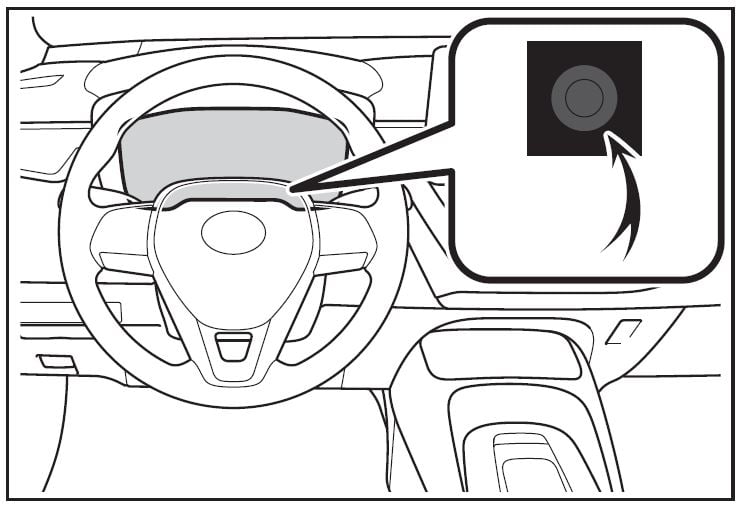
Display items
- Odometer
Displays the total distance the vehi-cle has been driven.
- Trip meter A/Trip meter B
Displays the distance the vehicle has been driven since the meter was last reset. Trip meters A and B can be used to record and display different distances independently.
To reset, display the desired trip meter and press and hold the dis-play change button.
Changing the instrument panel light brightness
The brightness of the instrument panel lights can be adjusted.
- Brighter
- Darker
Instrument panel light bright-ness adjustment
The brightness of the instrument panel lights can be adjusted sepa-rately for when the tail lights are on and off.
Adjusting the clock
The clocks can be adjusted on the audio system screen.
Refer to “MULTIMEDIA OWNER’S MANUAL”.
Gauges and meters (12.3-inch display)
Meter display
Locations of gauges and meters
- 2-dial type
- Tachometer
Displays the engine speed in revolutions per minute - Outside temperature
Displays the outside temperature within the range of -40°F (-40°C) to 140°F (60°C) - Speedometer
- Clock
- Speedometer
- Engine coolant temperature gauge Displays the engine coolant temperature
- Odometer display
Odometer: Displays the total distance the vehicle has been driven. - Multi-information display
Presents the driver with a variety of vehicle data
Displays warning messages if a malfunction occurs - Shift position indicator
- Fuel gauge
Displays the quantity of fuel remaining in the tank - Driving range
Displays driving range with remaining fuel.

- dial type
- Multi-information display
Presents the driver with a variety of vehicle data
Displays warning messages if a malfunction occurs - Outside temperature
Displays the outside temperature within the range of -40°F (-40°C) to 140°F (60°C) - Speedometer/Tachometer
Tachometer: Displays the engine speed in revolutions per minute
This setting can be changed on the setting screen. - Clock
- Engine coolant temperature gauge Displays the engine coolant temperature
- Odometer display
Odometer: Displays the total distance the vehicle has been driven. - Speedometer
- Shift position indicator
- Fuel gauge
Displays the quantity of fuel remaining in the tank - Driving range
Displays driving range with remaining fuel.
- Non-dial display

- Multi-information display
Presents the driver with a variety of vehicle data
Displays warning messages if a malfunction occurs - Outside temperature
Displays the outside temperature within the range of -40°F (-40°C) to 140°F (60°C) - Speedometer
- Clock
- Engine coolant temperature gauge Displays the engine coolant temperature
- Odometer display
Odometer: Displays the total distance the vehicle has been driven.
Shift position indicator - Fuel gauge
Displays the quantity of fuel remaining in the tank - Driving range
Displays driving range with remaining fuel.
Outside temperature display
- In the following situations, the cor-rect outside temperature may not be displayed, or the display may take longer than normal to change:
- When stopped, or driving at low speeds (less than 12 mph [20 km/h])
- When the outside temperature has changed suddenly (at the entrance/exit of a garage, tunnel, etc.)
- When “–” or “E” is displayed, the system may be malfunctioning. Take your vehicle to your Toyota dealer.
Driving range
- Use the displayed values as a ref-erence only.
- This distance is computed based on your average fuel consump-tion. As a result, the actual dis-tance that can be driven may differ from that displayed.
- When only a small amount of fuel is added to the tank, the display may not be updated. When refueling, turn the engine switch off. If the vehicle is refueled with-out turning the engine switch off, the display may not be updated.
Liquid crystal display
Free/Open Source Software Information
This product contains Free/Open Source Software (FOSS). The license information and/or the source code of such FOSS can be found at the following URL. https://www.denso.com/global/en/opensource/meter/toyota/
Customization
The gauges and meters can be cus-tomized in of the multi-informa-tion display.
WARNING
The information display at low temperatures
Allow the interior of the vehicle to warm up before using the liquid crystal information display. At extremely low temperatures, the information display monitor may respond slowly, and display changes may be delayed.
For example, there is a lag between the driver’s shifting and the new gear number appearing on the display. This lag could cause the driver to downshift again, causing rapid and exces-sive engine braking and possibly an accident resulting in death or injury.
NOTICE
To prevent damage to the engine and its components
- Do not let the indicator needle of the tachometer enter the red zone, which indicates the maxi-mum engine speed.
- The engine may be overheating if the engine coolant tempera-ture gauge is in the red zone (H). In this case, immediately stop the vehicle in a safe place, and check the engine after it has cooled completely.
Useful Links:
2023 Toyota Sequoia Specs, Price, Features, Mileage (Brochure)
2026 Toyota Corolla Cross Warning Lights and Indicator User Guide