


2026 Toyota Prius Keys and Smart Key User Guide
This guide examines the 2026 Toyota Prius keys and smart key, providing information on functionality, convenience, and usage. Understand complex features built for easy access and security.
Keys
Key types
The following keys are provided with the vehicle.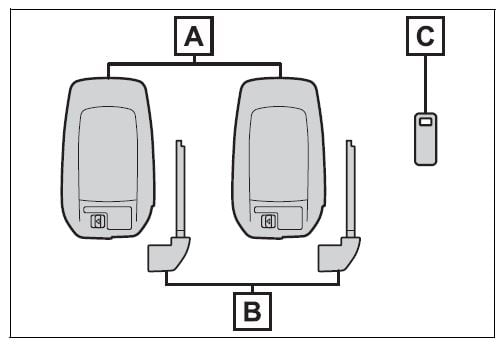
- Electronic keys
- Operating the smart key system
- Operating the wireless remote control function
- Mechanical keys
- Key number plate
When riding in an aircraft
When bringing an electronic key onto an aircraft, make sure you do not press any buttons on the elec-tronic key while inside the aircraft cabin. If you are carrying an elec-tronic key in your bag etc., ensure that the buttons are not likely to be pressed accidentally. Pressing a button may cause the electronic key to emit radio waves that could inter-fere with the operation of the air-craft.
Electronic key battery depletion
- The standard battery life is 1 to 2 years.
- If the battery becomes low, an alarm will sound in the cabin and a message will be displayed on the multi-information display when the hybrid system stops.
- To reduce key battery depletion when the electronic key is to not be used for long periods of time, set the electronic key to the bat-tery-saving mode.
- As the electronic key always receives radio waves, the battery will become depleted even if the electronic key is not used. The fol-lowing symptoms indicate that the electronic key battery may be depleted. Replace the battery when necessary.
- The smart key system or the wire-less remote control does not oper-ate.
- The detection area becomes smaller.
- The LED indicator on the key sur-face does not turn on.
You can replace the battery by your-self. However, as there is a danger that the electronic key may be damaged, it is recommended that replacement is carried out by your Toyota dealer.
- To avoid serious deterioration, do not leave the electronic key within 3 ft. (1 m) of the following electri-cal appliances that produce a magnetic field:
- TVs
- Personal computers
- Cellular phones, cordless phones and battery chargers
- Table lamps
- Induction cookers
- If the electronic key is near the vehicle for longer than necessary, even if the smart key system is not operated, the key battery may become depleted faster than nor-mal. When not operating the smart key system, it is recom-mended to not stay with the elec-tronic key near the vehicle longer than necessary.
If a message regarding the state of the electronic key or power switch mode, etc. is shown
To prevent trapping the electronic key inside the vehicle, leaving the vehicle carrying the electronic key on your person without turning the power switch to OFF or other pas-sengers from unintentionally taking the key out of the vehicle, etc., a message that prompts the user to confirm the state of the electronic key or power switch mode may be shown on the multi-information dis-play. In those cases, follow the instructions on the display immedi-ately.
If “Key Battery Low Replace Key Battery” is displayed on the multi-information display
The electronic key has a low bat-tery. Replace the electronic key bat-tery.
Replacing the battery
Confirmation of the registered key number
The number of keys already regis-tered to the vehicle can be con-firmed. Ask your Toyota dealer for details.
If “A New Key has been Regis-tered Contact Your Dealer for Details” is displayed on the multi-information display
This message will be displayed each time the driver’s door is opened when the doors are unlocked from the outside for approximately 10 days after a new electronic key has been registered. If this message is displayed but you have not had a new electronic key registered, ask your Toyota dealer to check if an unknown electronic key (other than those in your pos-session) has been registered.
NOTICE
To prevent key damage
- Do not drop the keys, subject them to strong shocks or bend them.
- Do not expose the keys to high temperatures for long periods of time.
- Do not get the keys wet or wash them in an ultrasonic washer, etc.
- Do not attach metallic or mag-netic materials to the keys or place the keys close to such materials.
- Do not disassemble the keys.
- Do not attach a sticker or any-thing else to the surface of the electronic key.
- Do not place the keys near objects that produce magnetic fields, such as TVs, audio sys-tems and induction cookers.
- Do not place the keys near medical electrical equipment such as low-frequency therapy equipment or microwave ther-apy equipment, and do not receive medical attention with the keys on your person.
Carrying the electronic key on your person
Carry the electronic key 3.9 in. (10 cm) or more away from elec-tric appliances that are turned on. Radio waves emitted from electric appliances within 3.9 in. (10 cm) of the electronic key may interfere with the key, causing the key to not function properly.
In case of a smart key system malfunction or other key-related problems
When an electronic key is lost
Wireless remote control
The electronic keys are equipped with the following wireless remote control: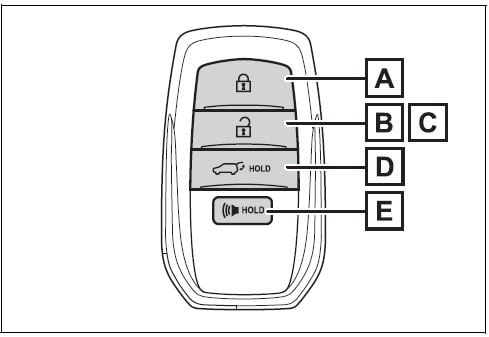
- Locks all the doors
- Unlocks all the doors
- Opens the side windows*
- Opens and closes the power back door (if equipped)
- Sounds the alarm
This setting must be customized at your Toyota dealer.
Theft deterrent panic mode
When is pressed for longer than about 1 second, an alarm will sound intermittently and the vehicle lights will flash to deter any person from trying to break into or damage your vehicle.
To stop the alarm, press any button on the electronic key.
Using the mechanical key
To take out the mechanical key, slide the release lever A and take the key out.
The mechanical key can only be inserted in one direction, as the key only has grooves on one side. If the key cannot be inserted in a lock cyl-inder, turn it over and re-attempt to insert it.
After using the mechanical key, store it in the electronic key. Carry the mechanical key together with the electronic key. If the electronic key battery is depleted or the entry function does not operate properly, you will need the mechanical key.
If you lose your mechanical keys
If a wrong key is used
The key cylinder rotates freely to isolate inside mechanism.
Digital Key
*: If equipped
A smartphone can be used instead of the electronic key of the vehicle by installing the dedicated Digital Key App on a smartphone. Also, Digital Key can be shared with your family or friends using the Digital Key App.
Free/open source software information
This product contains Free/open source software (FOSS). License information and/or the source code of this FOSS can be obtained at the following URL: https://www.denso.com/global/en/opensource/dkey/toyota/
Digital key usage condi-tions
In order to use the Digital Key, you need to install the Toyota App. Register the Vehicle to the customer’s Toyota App profile, and subscribe to Remote Ser-vices, and enroll in Digital Key.
Digital key precautions
- A Digital Key can be used when the smartphone and server can communicate. The Digital Key may become unusable if the smartphone is not connected to the Internet. Be sure to carry the electronic key of the vehicle if traveling to a location with unreliable communications.
- If the smartphone battery is depleted, the smartphone cannot be used as Digital Key. If the battery level is low, be sure to charge the smart-phone prior to going out.
- The Digital Key system is related to the smart key sys-tem. If the smart key system has been deactivated in the vehicle customization setting, the Digital Key will also be disabled.
- Depending on the radio wave environment, the Digital Key may not be able to be used.
- When transferring vehicle ownership, make sure to delete the Digital Keys.
- If the vehicle is not operated for 14 days or more, the Digi-tal Key will not connect auto-matically. Therefore, it may take some time before the system operates after a door handle is touched.
- A part of the services may be stopped for a certain period of time due to server mainte-nance. However, registered Digital Keys can be used during the maintenance.
- A smartphone with the Digital Key App enabled will be able to lock and unlock the doors, start the hybrid system and perform any other operations as same as the electronic key of the vehicle. Be especially careful not to lose the smart-phone or allow it to be stolen. If the smartphone is lost or stolen, contact your Toyota dealer immediately.
- When taking your vehicle to a Toyota dealer for an inspec-tion or repairs, make sure to bring an electronic key.
- With the Digital Key alone, no vehicle lights will illuminate when approached to the vehi-cle. Also, with the digital key alone, some functions, such as the power back door’s close & lock (Walk-Away) function, etc., cannot be used.
Smart key system
The following operations can be performed simply by carrying the electronic key on your person, for example in your pocket. The driver should always carry the electronic key.
- Locking and unlocking the doors
- Locking and unlocking the back door (if equipped)
- Starting the hybrid system
Antenna location
- Antenna outside the cabin (driver’s side)
- Antenna outside the cabin (front passenger’s side) (if equipped)
- Antenna outside the luggage compartment (if equipped)
- Antennas inside the cabin
Effective range (areas within which the electronic key is detected)
- When locking or unlocking the doors
The system can be operated when the electronic key is within about 2.3 ft. (0.7 m) of the driver’s door han-dle, front passenger’s door handle (if equipped) and back door opener switch (if equipped). (Only the doors detecting the key can be operated.) - When starting the hybrid system or changing power switch modes
The system can be operated when the electronic key is inside the vehi-cle.
If an alarm sounds or a warning message is displayed
An alarm sounds and warning mes-sage displays shown on the multi-information display are used to pro-tect against unexpected accidents or theft of the vehicle resulting from erroneous operation. When a warn-ing message is displayed, take appropriate measures based on the displayed message.
When only an alarm sounds, cir-cumstances and correction proce-dures are as follows.
- When an exterior alarm sounds once for 5 seconds
Situation Correction pro- cedure An attempt was made to lock the vehicle while a door was open. Close all of the doors and lock the doors again. - When an interior alarm pings con-tinuously
Situation Correction pro- cedure The power switch was turned to ACC while the driver’s door was open (or the driver’s door was opened while the power switch was in ACC). Turn the power switch to OFF and close the driver’s door.
If “Key Detected in Vehicle” is shown on the multi-information display
An attempt was made to lock the doors using the smart key system while the electronic key was still inside the vehicle. Retrieve the elec-tronic key from the vehicle and lock the doors again.
Battery-saving function
The battery-saving function will be activated in order to prevent the electronic key battery and the 12-volt battery from being discharged while the vehicle is not in operation for a long time.
- In the following situations, the smart key system may take some time to unlock the doors. Also the illuminated entry system may not operate properly.
- The electronic key has been left near of the vehicle for a certain period of time.
- The smart key system has not been used for 5 days or longer.
- If the smart key system has not been used for 14 days or longer, the doors cannot be unlocked at any doors except the driver’s door. In this case, take hold of the driver’s door handle, or use the wireless remote control or the mechanical key, to unlock the doors.
Turning an electronic key to battery-saving mode
- When battery-saving mode is set, battery depletion is minimized by stopping the electronic key from receiving radio waves.
Press 

Confirm that the electronic key indi-cator flashes 4 times.
While the battery-saving mode is set, the smart key system cannot be used. To cancel the function, press any of the electronic key buttons.

- Electronic keys that will not be used for long periods of time can be set to the battery-saving mode in advance.
When electronic key function stops
If the position of the electronic key has not changed for a certain amount of time such as when the electronic key is left somewhere, the function of the electronic key stops to reduce depletion of the battery. In this case, function can automati-cally be restored by moving the position of the key such as by lifting it up.
Conditions affecting operation
The smart key system uses weak radio waves. In the following situa-tions, the communication between the electronic key and the vehicle may be affected, preventing the smart key system, wireless remote control and immobilizer system from operating properly.
- When the electronic key battery is depleted
- Near a TV tower, electric power plant, gas station, radio station, large display, airport or other facil-ity that generates strong radio waves or electrical noise
- When the electronic key is in con-tact with, or is covered by the fol-lowing metallic objects
- Cards to which aluminum foil is attached
- Cigarette boxes that have alumi-num foil inside
- Metallic wallets or bags
- Coins
- Hand warmers made of metal
- Media such as CDs and DVDs
- When other wireless key (that emits radio waves) is being used nearby
- When carrying the electronic key together with the following devices that emit radio waves
- Portable radio, cellular phone, cordless phone or other wireless communication devices
- Another vehicle’s electronic key or a wireless key that emits radio waves
- Personal computers or personal digital assistants (PDAs)
- Digital audio players
- Portable game systems
- If window tint with a metallic con-tent or metallic objects are attached to the rear window
- When the electronic key is placed near a battery charger or elec-tronic devices
- When the vehicle is parked in a pay parking spot where radio waves are emitted.
If the doors cannot be locked/unlocked using the smart key system, lock/unlock the doors by performing any of the following:
- Bring the electronic key close to either front door handle and oper-ate the entry function.
- Operate the wireless remote con-trol.
If the doors cannot be
locked/unlocked using the above methods, use the mechanical key. If the hybrid system cannot be started using the smart key system.
Note for the entry function
- Even when the electronic key is within the effective range (detec-tion areas), the system may not operate properly in the following cases:
- The electronic key is too close to the window or outside door han-dle, near the ground, or in a high place when the doors are locked or unlocked.
- The electronic key is on the instru-ment panel, luggage compartment or floor, or in the door pockets or glove box when the hybrid system is started or power switch modes are changed.
- A person is between the vehicle and electronic key, blocking radio waves when the door is unlocked.
- Do not leave the electronic key on top of the instrument panel or near the door pockets when exiting the vehicle. Depending on the radio wave reception conditions, it may be detected by the antenna out-side the cabin and the door will become lockable from the outside, possibly trapping the electronic key inside the vehicle.
- As long as the electronic key is within the effective range, the doors may be locked or unlocked by anyone. However, only the doors detecting the electronic key can be used to unlock the vehicle.
- Even if the electronic key is not inside the vehicle, it may be possi-ble to start the hybrid system if the electronic key is near the window.
- The doors may unlock if a large amount of water splashes on the door handle, such as in the rain or in a car wash when the electronic key is within the effective range.(The doors will automatically be locked after approximately 60 sec-onds if the doors are not opened and closed.)
- If the wireless remote control is used to lock the doors when the electronic key is near the vehicle, there is a possibility that the door may not be unlocked by the entry function. (Use the wireless remote control to unlock the doors.)
- Touching the door lock sensor while wearing gloves may delay or prevent lock operation. Remove the gloves and touch the lock sen-sor again.
- When the lock operation is per-formed using the lock sensor, rec-ognition signals will be shown up to two consecutive times. After this, no recognition signals will be given.
- If the door handle becomes wet while the electronic key is within the effective range, the door may lock and unlock repeatedly. In that case, follow the following correc-tion procedures to wash the vehi-cle:
- Place the electronic key in a loca-tion 6 ft. (2 m) or more away from the vehicle. (Take care to ensure that the key is not stolen.)
- Set the electronic key to battery-saving mode to disable the smart key system.
- If the electronic key is inside the vehicle and a door handle becomes wet during a car wash, a message may be shown on the multi-information display and a buzzer will sound outside the vehi-cle. To turn off the alarm, lock all the doors.
- The lock sensor may not work properly if it comes into contact with ice, snow, mud, etc. Clean the lock sensor and attempt to operate it again.
- A sudden approach to the effec-tive range or door handle may pre-vent the doors from being unlocked. In this case, return the door handle to the original position and check that the doors unlock before pulling the door handle again.
- If there is another electronic key in the detection area, it may take slightly longer to unlock the doors after the door handle is gripped.
When the vehicle is not driven for extended periods
- To prevent theft of the vehicle, do not leave the electronic key within 6 ft. (2 m) of the vehicle.
- The smart key system can be deactivated in advance.
- Battery-saving mode can reduce the power consumption of elec-tronic keys.
To operate the system properly
Make sure to carry the electronic key when operating the system. Do not get the electronic key too close to the vehicle when operating the system from the outside of the vehi-cle.
Depending on the position and hold-ing condition of the electronic key, the key may not be detected cor-rectly and the system may not oper-ate properly. (The alarm may go off accidentally, or the door lock pre-vention may not operate.)
If the smart key system does not operate properly
- Locking and unlocking the doors: Use the mechanical key.
- Starting the hybrid system:
Customization
Settings (e.g. smart key system) can be changed. (Customizable features:
If the smart key system has been deactivated in a customized setting, refer to the explanations for the fol-lowing operations.
- Locking and unlocking the doors: Use the wireless remote control or mechanical key.
- Starting the hybrid system and changing power switch modes:
- Stopping the hybrid system:
WARNING
Caution regarding interfer-ence with electronic devices
- People with implantable car-diac pacemakers, cardiac resynchronization therapy-pacemakers or implantable car-dioverter defibrillators should keep away from the smart key system antennas. The radio waves may affect the operation of such devices. If necessary, the entry function can be disabled. Ask your Toyota dealer for details, such as the frequency of radio waves and timing of the emitted radio waves. Then, consult your doc-tor to see if you should disable the entry function.
- User of any electrical medical device other than implantable cardiac pacemakers, cardiac resynchronization therapy-pacemakers or implantable car-dioverter defibrillators should consult the manufacturer of the device for information about its operation under the influence of radio waves.
Radio waves could have unex-pected effects on the operation of such medical devices.
Ask your Toyota dealer for details for disabling the entry function.
Useful Links:
View Full PDF: 2026 Toyota Prius Owner’s Manual | Auto User Guide
2024 Prius Prime Review, Specs, Price and Mileage (Brochure)