


2026 Toyota Tundra Instrument Cluster User Guide
This blog gives information about the 2026 Toyota Tundra instrument cluster, emphasizing major displays and warning symbols. Understand key functions that keep drivers informed and confident.
Video: 2026 Toyota Tundra Dashboard Warning Indicators
Warning lights and indicators
The warning lights and indicators on the instrument cluster, overhead console and outside rear view mirrors inform the driver of the status of the vehicle’s various systems.
Instrument cluster
For the purpose of explanation, the following illustrations display all warning lights and indicators illuminated.
- 4.2-inch display type
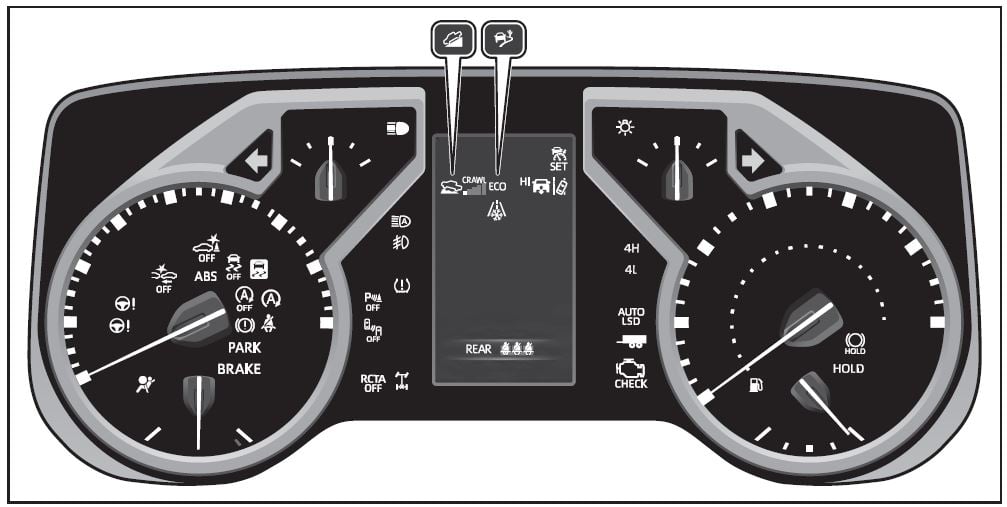 The units used on the meters and some indicators may differ depending on the target region.
 - Full LCD type
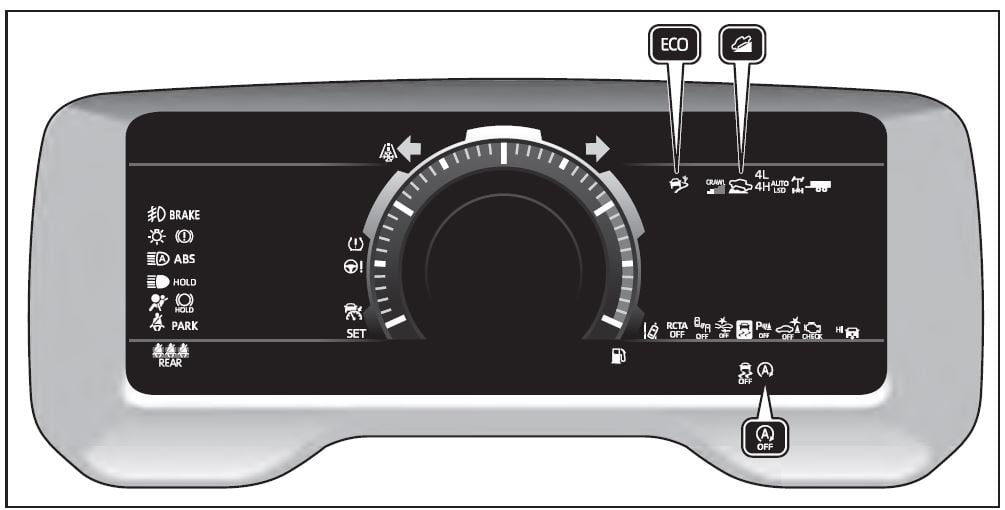 The units used on the meters and some indicators may differ depending on the target region.
Warning lights
Warning lights inform the driver of malfunctions in the indicated vehicle’s systems.
 Brake system warning light
Brake system warning light
Brake system warning light
Charging system warning light
High coolant temperature warning light
Low engine oil pressure warning light
Hybrid system overheat warning light
Malfunction indicator lamp
Malfunction indicator lamp
 SRS warning light
ABS warning light
ABS warning light
Electric power steering system warning light
Electric power steering system warning light
PCS warning light
LTA indicator
LDA indicator
PDA indicator
Dynamic radar cruise control indicator

Driving assist information indicator
Inappropriate pedal operation warning light
Brake hold operated indicator*
Parking brake indicator
Parking brake indicator
Tire pressure warning light
Low fuel level warning light
Rear passengers’ seat belt reminder light
- These lights come on when the engine switch is turned to ON to indicate that a system check is being performed. They will turn off after the engine is started, or after a few seconds. There may be a malfunction in a system if the light does not come on, or turn off. Have the vehicle inspected by your Toyota dealer.
- This light illuminates on multi-information display with a message.
- For 4.2-inch display type: This light illuminates on the multi-information display.
- Intuitive parking assist OFF indicator turns on when the engine switch is turned to ON while the Intuitive parking assist function is on. It will turn off after a few sec-onds.
WARNING
If a safety system warning light does not come on
Should a safety system light such as the ABS and SRS warning light not come on when you start the engine, this could mean that these systems are not available to help protect you in an accident, which could result in death or seri-ous injury. Have the vehicle inspected by your Toyota dealer immediately if this occurs.
Indicators
The indicators inform the driver of the operating state of the vehicle’s various systems.
 Turn signal indicator
Headlight indicator
Tail light indicator
Headlight high beam indicator
AHB indicator
Smart key system indicator
PCS warning light
LTA indicator
LTA indicator
 LTA indicator
LDA indicator
LDA indicator
LDA indicator
LDA indicator
LDA OFF indicator
PDA indicator
PDA indicator
Dynamic radar cruise control indicator
Dynamic radar cruise control indicator

Cruise control indicator
Intuitive parking assist OFF indicator
Intuitive parking assist detection indicator (if equipped)
Slip indicator light
VSC OFF indicator
Driving assist information
Outside rear view mirror indicators
Brake hold standby indicator
Brake hold operated indicator
 Security indicator
“READY” indicator
Low outside temperature indicator
EV indicator
Parking brake indicator
Parking brake indicator
EV drive mode indicator
Eco drive mode indicator
Sport mode indicator
Custom mode indicator
“PASSENGER AIR BAG” indicator lights
- This light illuminates on the multi-information display with a
message. - For 4.2-inch display type: This light illuminates on the multiinformation display
- Depending on the operating conditions of the system, the color
and state (illuminated/blinking) of the indicator change. - The light comes on when the system is turned off.
- Intuitive parking assist OFF indicator turns on when the engine
switch is turned to ON while the Intuitive parking assist function is
on. It will turn off after a few seconds. - These lights turn on when the engine switch is turned to ON to indicate that a system check is being performed. They will turn off after the engine is started, or after a few seconds. There may be a malfunction in a system if the lights do not turn on, or turn off. Have the vehicle inspected by your Toyota dealer.
- This light illuminates on the outside rear view mirrors
- This light illuminates on the overhead console.
- When the outside temperature is approximately 37°F (3°C) or lower, the indicator will flash for approximately 10 seconds, then
stay on.
Gauges and meters (4.2-inch display type)
The meters display various drive information.
Meter display
The units used on the meter and display may differ depending on the target region.
- Tachometer
Displays the engine speed in revolutions per minute - Engine oil pressure gauge Displays the engine oil pressure
- Outside temperature
- Clock
Time displayed is linked to the multimedia system. For details, refer to “MULTIMEDIA OWNER’S MANUAL”. - Voltmeter
Displays the charge state - Speedometer
Displays the vehicle speed - Fuel gauge
Displays the quantity of fuel remaining in the tank - Odometer and trip meter
- Shift position and shift range display
Displays the selected shift position or selected shift range - Multi-information display
Presents the driver with a variety of driving-related data Displays warning messages if a malfunction occurs - Engine coolant temperature gauge Displays the engine coolant temperature
The meters and display illumi-nate when
The engine switch is in ON.
Clock settings screen
If clock setting item is displayed information display, the system may be malfunctioning. Have the vehicle inspected by your Toyota dealer.
Outside temperature display
- In the following situations, the cor- rect outside temperature may not be displayed, or the display may take longer than normal to change.
- When stopped, or driving at low speeds (less than 12 mph [20 km/h])
- When the outside temperature has changed suddenly (at the entrance/exit of a garage, tunnel, etc.)
- When “–” or “E” is displayed, the system may be malfunctioning. Take your vehicle to your Toyota dealer.
- Displays the outside temperature within the range of -40°F (-40°C) to 122°F (50°C).
- When the outside temperature is approximately 37°F (3°C) or for approximately 10 seconds, then stay on.
Customization
Settings (e. g. meter display) can be changed on screen of the multi-information display.
WARNING
The information display at low temperatures
Allow the interior of the vehicle to warm up before using the liquid crystal information display. At extremely low temperatures, the information display monitor may respond slowly, and display changes may be delayed.
For example, there is a lag between the driver’s shifting and the new gear number appearing on the display. This lag could cause the driver to downshift again, causing rapid and exces-sive engine braking and possibly an accident resulting in death or injury.
NOTICE
To prevent damage to the engine and its components
- Do not let the indicator needle of the tachometer enter the red zone, which indicates the maxi-mum engine speed.
- The engine may be overheating if the engine coolant temperature
gauge is in the red zone (H). In this case, immediately stop the vehicle in a safe place, and check the engine after it has cooled completely.
Voltmeter
When the voltmeter indicates 19 V or higher or 9 V or lower while the engine is running, there may be a battery or charging system malfunction. Have the vehicle inspected at your Toyota dealer.
Engine oil pressure gauge
When the value of the engine oil pressure gauge drops while the engine is running, stop the vehicle in a safe place immediately and check the amount of engine oil. When the oil pressure drops even though the engine oil amount has not decreased, or if the oil pres-sure does not increase when engine oil is added, contact your Toyota dealer, as there may be a problem with the lubrication sys-tem.
Odometer and trip meter display
Display items
- Odometer
Displays the total distance the vehi-cle has been driven. - Trip meter A/Trip meter B
Displays the distance the vehicle has been driven since the meter was last reset. Trip meters A and B can be used to record and display different distances independently. - Distance until next engine oil change
Displays the distance the vehicle can be driven until an oil change is necessary.
Changing the display
Each time the “ODO TRIP” switch is pressed, the displayed item will be changed. When the trip meter is displayed, pressing and holding the switch will reset the trip meter.

In some situations the following will be temporarily displayed:
Distance until next engine oil change Displays the distance until the next engine oil change. This display will be displayed in the following situa-tions:
- When the engine switch is turned to ON.
- When a warning message indicating that oil mainte-nance should be performed soon or is required is dis-played.
Instrument panel light control
The brightness of the instrument panel lights can be adjusted.
Pressing the button will adjust brightness of the instrument panel light.
The brightness of the instrument panel lights can be adjusted by pressing the button. Short press: 1 step change of brightness level. Long press: continues change of brightness level until released.
Instrument cluster brightness adjustment
The instrument cluster brightness levels when the tail lights are on and off can be adjusted individually. However, when the surroundings are bright (daytime, etc.), turning on the tail lights will not change the instrument cluster brightness.
Useful Links:
2023 – 2024 Toyota Tundra Review Specs, Price and Mileage (Brochure)
2026 Toyota Tundra Smart Cruise Control (SCC) User Guide
2026 Toyota Tundra Alarm System / Security User Guide