


2023 Toyota 4Runner Warning Lights and Indicator User Guide
The 2023 Toyota 4Runner’s warning lights and indicators are covered in this guide. For safe driving and car maintenance, understanding these signals helps you spot problems early.
2023 Toyota 4Runner Specs, Price, Features and Mileage
Video: 2023 Toyota 4Runner Warning Lights
Warning lights and indicators
The warning lights and indicators on the instrument cluster and center panel inform the driver of the status of the vehicle’s various systems. For the purpose of explanation, the following illustration displays all warning lights and indicators illuminated. The units used on the speedometer and some indicators may differ depending on where the vehicle is sold.
Warning lights
Warning lights inform the driver of malfunctions in the indicated vehicle’s systems.
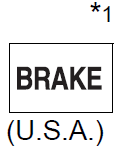 Brake system warning light
 Brake system warning light
 High coolant temperature warning light
 Charging system warning light
 Malfunction indicator lamp
 Malfunction indicator lamp
 SRS warning light
 ABS warning light
  ABS warning light
- Slip indicator
 Four-wheel drive indicator light
 Low speed four-wheel drive indicator light
  Rear differential lock indicator light
 Center differential lock indicator light
 Multi-terrain Select indicator light
 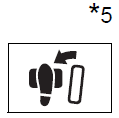 Brake Override System/ Drive-Start Control/ warning light
 Parking brake indicator
 Parking brake indicator
 BSM OFF (Blind Spot Monitor) indicator
 RCTA OFF (Rear Cross Traffic Alert) indicator
 PCS warning light
 LDA indicator
 Open door warning light
 Low fuel level warning light
  Seat belt reminder light
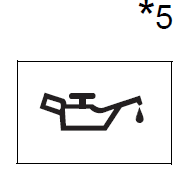 Low engine oil pressure warning light
  Power steering warning light
 Master warning light
 Tire pressure warning light
 Unengaged “Park” warning light
 KDSS warning light
 Automatic running boards indicator light
- *1:These lights turn on when the engine switch is turned to IGNITION ON mode to indicate that a system check is being performed. They will turn off after the engine is started, or after a few seconds. There may be a malfunction in a system if a light does not come on, or turn off. Have the vehicle inspected by your Toyota dealer.
- *2: This light flashes to indicate a malfunction.
- *3: This light flashes rapidly to indicate a malfunction.
- *4: This light flashes continuously to indicate a malfunction.
- *5: This light illuminates on the multi-information display.
- *6: This light flashes or illuminates to indicate a malfunction.
Indicators
The indicators inform the driver of the operating state of the vehicle’s various systems.
 Turn signal indicator
 Headlight indicator
 Tail light indicator
 Headlight high beam indicator
 Automatic High Beam indicator
 Front fog light indicator
 Security indicator
 Eco Driving Indicator Light
 Parking brake indicator
  Parking brake indicator
 “TRAC OFF” indicator
 Slip indicator
  VSC OFF indicator
 AIR BAG ON/OFF” indicator
 “AIR BAG ON/OFF” indicator
 Cruise control indicator
 Dynamic radar cruise control indicator
 Cruise control set indicator
 PCS warning light
 RCTA OFF (Rear Cross Traffic Alert) indicator
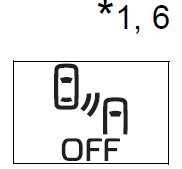 BSM OFF (Blind Spot Monitor) indicator
  Outside rear view mirror indicator
 LDA indicator
 LDA indicator
  Four-wheel drive indicator
 Downhill assist control system indicator
 Low speed four-wheel drive indicator
 Rear differential lock indicator
 Center differential lock indicator
 “A-TRAC” indicator
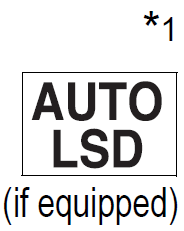 “AUTO LSD” indicator
 Multi-terrain Select indicator
 Crawl Control indicator
 Intuitive parking assist indicator
 Automatic running boards indicator
*1: These lights turn on when the engine switch is turned to IGNITION ON mode to indicate that a system check is being performed. They will turn off after the engine is started, or after a few seconds. There may be a malfunction in a system if a light does not come on, or turn off. Have the vehicle inspected by your Toyota dealer.
*2: This light flashes to indicate that the system is operating.
*3: This light does not turn on when the system is disabled.
*4: This light illuminates on the center panel.
*5: This light illuminates on the multi-information display.
*6: This light turns on when the system is off.
*7: In order to confirm operation, the BSM outside rear view mirror indicators illuminate in the following situations:
• When the engine switch is turned to IGNITION ON mode while the system is set to on.
• When the system is set to on while the engine switch is in IGNITION ON mode.
*8: This light illuminates on the outside rear view mirrors.
WARNING
If a safety system warning light does not come on Should a safety system light such as the ABS and SRS warning light not come on when you start the engine, this could mean that these systems are not available to help protect you in an accident, which could result in death or serious injury. Have the vehicle inspected by your Toyota dealer immediately if this occurs.
Gauges and meters
- Tachometer
- Displays the engine speed in revolutions per minute
- Engine coolant temperature gauge
- Displays the engine coolant temperature
- Multi-information display
- Presents the driver with a variety of vehicle data
- Fuel gauge
- Displays the quantity of fuel remaining in the tank
- Speedometer
- Displays the vehicle speed
- Odometer/trip meter display change button
- Switches the trip information.
- Odometer/trip meter display
- Shift position and shift range
- Displays the selected shift position or selected shift range

- Displays the selected shift position or selected shift range
Changing the display
Switches between odometer and trip meter displays. When the trip meter is displayed, pressing and holding the button will reset the trip meter.
Instrument panel light control
The brightness of the instrument panel lights can be adjusted.
- Brighter
- Darker
- The meters and display illuminate when
- The engine switch is in IGNITION ON mode.
- The brightness of the instrument panel lights
- When the headlight switch is turned to on, the brightness will be reduced slightly unless the control dial is turned fully upward.
NOTICE
- To prevent damage to the engine and its components
- Do not let the indicator needle of the tachometer enter the red zone, which indicates the maximum engine speed.
- The engine may be overheating if the engine coolant temperature gauge is in the red zone (H). In this case, immediately stop the vehicle in a safe place, and check the engine after it has cooled completely.
2023 Toyota 4Runner Specs, Price, Features and Mileage
Multi-information display
Summary of functions
The multi-information display presents the driver with a variety of driving-related data, such as the current outside temperature. The multi-information display can also be used to change the display settings and other settings
- Shift position and shift range
- Menu icon display area
- Displays the following items.
- When a menu icon is not selected, the outside temperature is displayed.
- Menu icons
- Outside temperature
- When a menu icon is not selected, the outside temperature is displayed.
- Displays the following items.
- Content display area
- A variety of information can be displayed by selecting a menu icon. Additionally, warning or pop-up display will be displayed in some situations.
- Menu icon content
- Warning message
- A variety of information can be displayed by selecting a menu icon. Additionally, warning or pop-up display will be displayed in some situations.
- Odometer and trip meter
- Indicators
- Meter control switches
Operating the meter control switches
The multi-information display is operated using the meter control switches.
- Scroll screens*, change the displayed content* and move the cursor
- Press: Enter/Set
- Press and hold:
- Reset/Display the next screen
- Press: Displays the screen registered as the top screen
- When no screen has been registered, the drive information screen will be displayed.
- Press and hold: Registers the currently displayed screen as the top screen
- When the confirmation screen is displayed, select yes to register the screen. If the selected screen cannot be registered, a registration failure message will be shown.
- Return to the previous screen
- Call sending/receiving display
- Linked with the hands-free system, sending or receiving call is displayed. For details regarding the hands-free system, refer to the “Navigation system owner’s manual”.
- When the screen can be scrolled or different content can be displayed, a mark, such as an arrow, will be displayed to suggest which switch to operate.
Menu icons
 Drive information
- Select to display various drive data.
 Vehicle information display
- Select to display the vehicle information.
 Navigation system-linked display (if equipped)
- Select to display the following navigation system-linked information.
- Route guidance
- Compass display (north-up display/heading-up display)
- Select to display the following navigation system-linked information.
 Audio system-linked display (if equipped)
- Select to enable selection of an audio source or track on the display using the meter control switches.
 Driving assist system information
- Select to display the operational status of the following systems:
- Dynamic radar cruise control
- LDA (Lane Departure Alert)
- Select to display the operational status of the following systems:
 Warning message display
- Select to display warning messages and measures to be taken if a malfunction is detected.
- When there are no current warning messages, “No Messages” is displayed.
- When there are multiple warning messages, or can be used to switch the displayed warning message.
- Select to display warning messages and measures to be taken if a malfunction is detected.
 Settings display
- Select to change the meter display settings and the operation settings of some vehicle functions.
Drive information
Items displayed can be switched by pressing or up and down.
After Start
-
- Average fuel economy*
- Displays the average fuel consumption since the engine was started.
- Average vehicle speed
- Displays the average vehicle speed since the engine was started.
- Elapsed time
- Displays the elapsed time since the engine was started.
- Use the displayed average fuel economy as a reference.

- Average fuel economy*
After Reset
- Current fuel economy
- Displays the current rate of fuel consumption.
- Average fuel economy*1,2
- Displays the average fuel consumption since the function was reset.
- Average speed*2
- Displays the average vehicle speed since the function was reset.
- Elapsed time*2
- Displays the elapsed time since the function was reset.
- *1: Use the displayed average fuel economy as a reference.
- *2: Pressing and holding
 will reset.
After Refuel
- Range*1,2
- Displays the driving range with remaining fuel.
- Average fuel economy*2,3
- Displays the average fuel consumption since the vehicle was refueled.
- *1: This distance is computed based on your average fuel consumption. As a result, the actual distance that can be driven may differ from that displayed.
- *2: When only a small amount of fuel is added to the tank, the display may not be updated. When refueling, turn the engine switch off. If the vehicle is refueled without turning the engine switch off, the display may not be updated.
- *3: Use the displayed average fuel economy as a reference.

- Displays the average fuel consumption since the vehicle was refueled.
- Eco Indicator (Eco Driving Indicator Zone Display)
- Speed
- Displays the vehicle speed.
- Vehicle sway warning
- Detects the sway of the vehicle within a lane, which is often associated with a decrease in the driver’s attention level, and displays the decrease in attention using a bar display.
- The shorter the bar length, the more the driver may need to rest.
- This display is a part of the LDA (Lane Departure Alert) system. The display is enabled when the operating conditions of the vehicle sway warning function are met. Blank screen (display off)
- Drive information is not displayed.
Vehicle information
Items displayed can be switched by pressing  up and down.
- Steering angle
- Displays the direction of the front tires.
- The tire direction is displayed in 3 stages for both left and right, in accordance with the angle of the tire.
- If a battery terminal is disconnected and reconnected, the display may be disabled temporarily. After driving the vehicle for a while, the display will be enabled.
- Tire inflation pressure
- Displays inflation pressure of each tire.
- The inflation pressure of the spare tire will be displayed. (if equipped)
Settings display
The settings of some features can be changed by using the meter control switches.
- Setting procedure
- On the setting screen, choose the desired item using , and then press
- For functions that can be enabled or disabled, the function switches between on and off each time is pressed.
- For functions that allow to select operation contents, display contents, etc., the setting screen is displayed.
- For functions that can be enabled or disabled, the function switches between on and off each time
- Select the desired setting by operating , and then press . To stop the selection, press
 to return to the previous screen.
- On the setting screen, choose the desired item using
Setting items
 LDA (Lane Departure Alert)
- Select to set up LDA.
- Alert sensitivity
- Sway warning
- Sway sensitivity
- Select to set up LDA.
 BSM (Blind Spot Monitor)
- Select to activate/deactivate BSM.
- BSM on/off
- BSM sensitivity
- Outside rear view mirror indicator brightness
- Select to activate/deactivate BSM.
 RCTA (Rear Cross Traffic Alert)
- Select to activate/deactivate RCTA.
- RCTA on/off
- Select to activate/deactivate RCTA.
 PCS (Pre-Collision System)
- Select to set the following items.
- PCS on/off
- PCS sensitivity
- Select to set the following items.
 Intuitive parking assist (if equipped)
- Select to set the Intuitive parking assist on/off
- Vehicle settings
- “TPWS” (Tire Pressure Warning System)
- “Set Pressure”
- Select to initialize the tire pressure warning system.
- “Change Wheel Set”
- Select to register the ID codes of the tire pressure sensors to the tire pressure warning system.3
Meter settings
Select to set the following items.
- Language
- Select to change the language on the display.
- Units
- Select to change the unit for measure.
 Eco Driving Indicator Light
- Select to activate/deactivate the Eco Driving Indicator Light.
 switch settings
- You can register 1 screen as the top screen. To register, press and hold while the desired screen is displayed.
- You can register 1 screen as the top screen. To register, press and hold
- Pop-up display
- Select to set the pop-up displays, which may appear in some situations, on/off.
- Initialization
- Select to reset the meter display settings.
Other contents
- Multi-terrain Select display* (if equipped)
- Crawl Control display* (if equipped)
- Outside temperature display
- Displays the outside temperature
- The temperature range that can be displayed is from -40 °F (-40 °C) to 122 °F (50 °C).
- When the outside temperature drops below 37 °F (3 °C),
 will flash for approximately 10 seconds, then stay on.
- Customization
- Settings (e.g. available language) can be changed. (Customizable features:
- Automatically displayed when the system is used
Eco Driving Indicator
- Eco Driving Indicator Light
- Eco Driving Indicator Zone Display
- Suggests the Zone of Eco-driving with the current Eco-driving ratio based on acceleration.
- Eco-driving ratio based on acceleration
- If the acceleration exceeds the Zone of Eco-driving, the right side of Eco Driving Indicator Zone Display will illuminate.
- Zone of Eco-driving
- Eco Driving Indicator will not operate under the following conditions:
- The shift lever is in any position other than D.
- The vehicle speed is approximately 80 mph (130 km/h) or higher.
- The Crawl Control is operating. (if equipped)

- Eco Driving Indicator will not operate under the following conditions:
Pop-Up display
The pop-up display is displayed on the multi-information display according to the operating conditions of the following functions:
- Route guidance display of the navigation system-linked system (if equipped)
- Incoming call display of the hands-free phone system The pop-up display function can be disabled.
2023 Toyota 4Runner Specs, Price, Features and Mileage
Tire inflation pressure
- It may take a few minutes to display the tire inflation pressure after the engine switch is turned to IGNITION ON mode. It may also take a few minutes to display the tire inflation pressure after inflation pressure has been adjusted.
- “—” may be displayed if the tire information cannot be determined due to unfavorable radio wave conditions.
- Tire inflation pressure changes with temperature. The displayed values may also be different from the values measured using a tire pressure gauge.
Outside temperature display
In the following situations, the correct outside temperature may not be displayed, or the display may take longer than normal to change:
- When the vehicle is stopped, or moving at low speeds (less than 12 mph [20 km/h])
- When the outside temperature has changed suddenly (at the entrance/exit of a garage, tunnel, etc.)
- When “–” or “E” is displayed, the system may be malfunction. Take your vehicle to Toyota dealer.
Liquid crystal display
Small spots or light spots may appear on the display. This phenomenon is characteristic of liquid crystal displays, and there is no problem continuing to use the display
WARNING
- Caution for use while driving
- For safety, avoid operating the meter control switches while driving as much as possible, and do not look continuously at the multi-information display while driving. Stop the vehicle and operate the meter control switches. Failure to do so may cause a steering wheel operation error, resulting in an unexpected accident.
- Cautions while setting up the display
- As the engine needs to be running during setting up the display, ensure that the vehicle is parked in a place with adequate ventilation. In a closed area such as a garage, exhaust gases including harmful carbon monoxide (CO) may collect and enter the vehicle. This may lead to death or a serious health hazard.
- The multi-information display at low temperatures
- Allow the interior of the vehicle to warm up before using the multi-information display. At extremely low temperatures, the multi-information display monitor may respond slowly, and display changes may be delayed. For example, there is a lag between the driver’s shifting and the new gear number appearing on the display. This lag could cause the driver to downshift again, causing rapid and excessive engine braking and possibly an accident resulting in death or serious injury.
NOTICE: While setting up the display
To prevent battery discharge, ensure that the engine is running while setting up the display features.
FAQs
- What information does the instrument cluster in the Toyota 4Runner 2023 display?
The instrument cluster shows vital data, including the following: the vehicle’s speed, engine RPM, fuel level, temperature, the amount of time left on the trip, the outside temperature, navigation instructions, audio system details, and customizable vehicle settings. - Can I customize the display layout of the instrument cluster?
Yes, the Toyota 4Runner 2023’s instrument panel has programmable settings that let you organize and prioritize the information according to your preferences. - Are there warning systems in the instrument cluster?
Yes, there are warning systems built into the instrument cluster that can notify you of things like low fuel levels, irregular tire pressure, engine check warnings, and other safety-related notifications. - Does the instrument cluster provide off-road capability displays?
The instrument cluster may offer specialized displays, such as inclinometers, that show real-time data about the vehicle’s pitch and roll angles during off-road driving if it is equipped with off-road features. - Can I connect my smartphone to the instrument cluster?
The Toyota 4Runner 2023’s instrument cluster might have connectivity options, allowing you to connect your smartphone and access apps, make hands-free calls, and stream music, depending on the trim level and features. - Does the instrument cluster integrate with driver assistance features?
In order to keep you informed and vigilant, the instrument cluster may integrate with driver assistance features like lane departure warnings, adaptive cruise control, blind-spot monitoring, and pre-collision braking systems. - Is the instrument cluster illuminated for nighttime driving?
The instrument cluster does have adequate lighting for nighttime driving, yes. To improve visibility, it typically provides adjustable brightness and color options. - Are there maintenance and service reminders in the instrument cluster?
Yes, there are maintenance and service reminder systems that can be installed in the instrument cluster to notify you when it’s time for regular maintenance like tire rotations or oil changes. - Can I monitor fuel efficiency through the instrument cluster?
It’s possible that the instrument cluster will give you real-time feedback on your fuel usage, allowing you to keep an eye on your fuel economy and modify your driving style to maximize it. - Can I adjust vehicle settings through the instrument cluster?
Yes, the instrument cluster frequently integrates with the vehicle’s settings, enabling you to adjust a variety of aspects of the behavior of the vehicle, including comfort settings, the sensitivity of the driver assistance systems, and door locking preferences. - Does the instrument cluster have an odometer and trip meters?
Yes, the instrument cluster typically has a trip meter to track individual trip distances and an odometer to track overall mileage. - Is the instrument cluster designed to be user-friendly?
Yes, the Toyota 4Runner 2023’s instrument panel is built with a user-friendly interface. Information is presented with a layout, graphics, and organization that is designed for simple comprehension and low distraction. - Can I access vehicle diagnostics through the instrument cluster?
Some Toyota 4Runner models offer access to diagnostic data through the instrument cluster, enabling you to check the status of specific vehicle systems, though specific diagnostic features may vary. - Does the instrument cluster display information in both digital and analog formats?
Yes, the instrument cluster frequently combines analog gauges for a traditional and intuitive representation of vehicle parameters like speed, fuel level, and engine RPM with digital displays for accurate readings. - How can I interact with the instrument cluster while driving?
Through voice commands and controls mounted on the steering wheel, you can interact with the instrument cluster while driving. This lets you navigate menus and access information without taking your hands off the wheel or your eyes off the road.
Useful Link
Read Full PDF: Toyota 4Runner 2023 User Guide | Auto User Guide
2023 Toyota 4Runner Specs, Price, Features and Mileage