


2026 Audi Q3 Instrument Cluster User Guide
This blog will help you comprehend the 2026 Audi Q3 instrument cluster, including full information on its digital display functions and indicators. Understand how each symbol improves driving awareness, offering a safe and informed experience behind the wheel with innovative Audi technology.
Video: Audi Q3 Warning Lights and Indicator
Instrument Cluster
Instrument cluster overview

- Display
- Engine coolant temperature
- Left dial
- Tachometer.
- Tabarea
- Central area
- Status bar (one or two lines)
- Right dial
- Convenience display
- Fuel level
- Right additional display with speedometer
- Left additional display with:
- Selector lever position
- Audi drive select mode
Warning
If there is a serious system malfunction, the display may turn off. The indicator light may also turn on. Stop the vehicle safely. See an authorized Audi dealer or authorized Audi Service Facility for assistance.
Tips
- The following pages primarily show illustrations of the Audi virtual cockpit plus*. The display or location of the items that are shown may vary on the different versions of the instrument cluster.
- You can select the units used for temperature, speed, and other measurements .
- Speeds are displayed in mph (miles per hour) or km/h (kilometres per hour).
Operating
 Information is organized within various tabs 1 in the instrument cluster. The tab contents are displayed in the central area 2.
Requirement: the ignition must be switched on.
Selecting a tab
- Press the button 3 repeatedly until the desired tab is selected.
Returning to functions at higher levels
- Press the button 5.
Opening and closing the menu
- Press the button 6.
Selecting and confirming a function
Requirement: a menu or list must be displayed.
- To select a function, turn the left thumbwheel 7 to the desired function.
- To confirm a selection, press the left thumb wheel7
Switching the view
- Press the VIEW button 4.
Overview of the tabs
Depending on vehicle equipment, the following tabs may be available: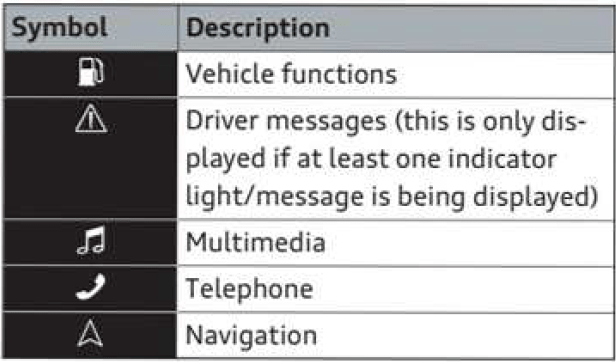
Adjusting the display
Switching the view
- Press the VIEW button to switch between the default view1 and the enhanced view2.
Adjusting the layout
Depending on the vehicle equipment, various layouts
may be available.
- Applies to: MMI: Select on the home screen: SETTINGS > Display & Brightness > Audi virtual cockpit.
- To adjust the desired layout, press 3.
Adjusting the additional display
Depending on the vehicle equipment, the additional displays that can be selected may vary.
- Applies to: MMI: Select on the home screen: SETTINGS > Display & Brightness > Audi al cockpit > Configure.
- Select the desired additional display.
Reducing the display
Depending on the vehicle equipment, you can hide the central area in the instrument cluster.
- Select on the instrument cluster: vehicle functions tab > I button > Reduced display.
- Press the VIEW button on the multifunction steering wheel.
Coolant temperature display
The coolant temperature display only functions when the ignition is switched on. To reduce the risk of engine damage, please observe the following notes about the temperature ranges.
Cold range
If only the LEDs at the bottom of the gauge had been turned on, the engine would not have reached operating temperature yet. Avoid high engine speeds, full acceleration, and heavy engine loads.
Normal temperature
The LEDs will settle somewhere in the centre of the display once the engine has reached operat-ing temperature. If the warning lamp  lights up in the instrument cluster display, the coolant temperature is too high
CAUTION
- Auxiliary headlights and other attachments in front of the cooling air inlet reduce the cooling effect of the coolant. At high out-side temperatures and high engine loads, there is a risk of the engine overheating.
- The front spoiler also ensures proper distri-bution of the cooling air when the vehicle is moving. If the spoiler is damaged this can reduce the cooling effect, which could cause the engine to overheat. Seek professional assistance.
Note
Applies to: vehicles with diesel engine
These engines are so efficient that they may not reach their full operating temperature in very cold weather. This is quite normal and no cause for concern.
Rev counter
The rev counter indicates the num-ber of engine revolutions per minute. The start of the red zone on the dial indicates the maximum. engine speed which may be used briefly in all gears after the engine has been run in properly. However, it is advisable to change up a gear or se-lect transmission position D/S (or lift your foot off the accelerator) before the needle reaches the red zone.
Engine speed governing
If the indicator lamp 
If the rev limiter has been activated because of a fault in the engine management system, the indi-cator lamp
 will also light up. Make sure that the engine speed does not exceed the speed dis-played in the driver information system, for ex-ample when shifting down a gear. Drive to a qualified workshop without delay and have the fault rectified.
CAUTION
The rev counter needle must only ever briefly go into the red zone on the scale; otherwise there is a risk of engine damage. The start of the red zone on the dial is different for some engine versions.
Mileage recorder
The trip recorder and odometer are displayed in the status line. The trip recorder shows the distance that has been travelled since it was last reset. It is used to measure individual journeys. The odometer re-cords the vehicle’s total mileage.
Resetting trip recorder
- On the instrument cluster, select the vehicle functions tab > button > Reset kilometres.
Outside temperature display
The outside temperature is displayed in the sta-tus line. When the vehicle is stationary or travelling at very low speeds, the temperature displayed in the instrument cluster may be higher than the actual outside temperature as a result of the heat radiated from the engine.
At temperatures below +5 °C a snowflake symbol appears next to the temperature display ð .
WARNING
Do not rely on the outside temperature dis-play as an ice warning. Bear in mind that there may be patches of ice on the roads even at outside temperatures around +5 °C – risk of accident!
Engine oil temperature gauge
Applies to: vehicles with engine oil temperature gauge
The engine oil temperature is indicated by a bar display in the instrument cluster, depending on your vehicle’s equipment.
- Call up the vehicle functions tab and change to the extended view
The display shows — °C at low engine oil temper-atures. The engine has reached its operating temperature in normal driving conditions when the oil temperature is between 80 ℃ and 120 ℃. If the engine is running under increased load at high ambient temperatures, the oil temperature may increase above this value. This is no cause for concern, provided that the indicator/warning lamps  are not lit.
Vehicle functions
Vehicle functions
Overview
The trip computer is displayed in the first tab of the driver information system. Additional vehicle functions can be accessed depending on the vehicle equipment.
- Press the button on the multifunction steering wheel.
- Trip computer
- Reduced display
- Reset trip odometer
On board computer
Changing the display
- Turn the left thumbwheel on the multifunction steering wheel 7 until the desired display is shown.
Resetting values to zero
Requirement: the Consumption, Short-term memory or Long-term memory display must be selected.
- To reset the values in one of the memories to zero, press and hold the left thumb wheels on the multifunction steering wheel for one second,
- Select the instrument cluster: vehicle functions tab button > Reset mi.
Displays in the trip computer
The following displays may be shown, depending on the vehicle equipment:
- Time and date
- Average consumption
- Short-term memory overview
- Long-term memory overview
- Energy consumers
- Driver assistance
- Traffic sign recognition and traffic light information
Short-term memory and long-term memory
Short-term memory collects driving information from the time the ignition is switched on until it is switched off. If you continue driving within two hours after switching the ignition off, the new values will be included when calculating the current trip information.
Unlike the short-term memory, the long-term memory is not erased automatically. You can select the period for evaluating trip information yourself.
Average fuel consumption
The current consumption can be shown using a bar graph. The average consumption stored in the short-term memory is also displayed. If the bar is green, your vehicle is saving energy (for example, using recuperation).
Note
The date, the time and the time/date display format can be changed
Gear shift indicator
To familiarise yourself with the gear shift indica-tor, drive in the normal way to start with. A gear change will be recommended on the instrument cluster display if the gear you are in is not the most economical choice. If no gear change is rec-ommended, you are already in the most econom-ical gear.
Vehicles with manual gearbox
- Change up a gear: The suggested gear ap-pears to the right of the current gear when a higher gear is recommended.
- Change down a gear: The suggested gear ap-pears to the left of the current gear when a lower gear is recommended.
- N: This is displayed in place of the current gear. Put the gear lever in neutral and take your foot off the clutch pedal. The engine will be switched off automatically.
Vehicles with automatic gearbox
The display is only visible in tiptronic mode
CAUTION
The gear shift indicator is intended to help the driver save fuel. It is not intended to rec-ommend the right gear for all driving situa-tions. In certain situations, only the driver can choose the correct gear (for instance when overtaking or driving up a steep gradient).
Useful Links:
2024 Audi Q3 Specs, Price, Features, Mileage
2026 Audi Q3 Warning Lights and Indicator User Guide
2026 Audi Q3 Fuses and Fuse Box User Guide