
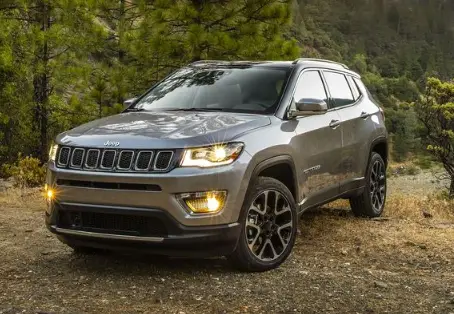

2020 Jeep Compass Owner’s Manual
The 2020 Jeep Compass is a small SUV that combines modern luxury with rugged off-road ability. It is a great example of what the Jeep brand is all about. It appeals to both city workers and people who like to go on adventures, thanks to its unique seven-slot grille and available high-end features. It has a choice of engines that are both fuel-efficient and quick to respond, and with the 4×4 option, it can handle both city streets and rough terrain. Inside, the Compass has a nice cabin with high-tech features, comfortable seats, and a lot of room for cargo. The 2020 Jeep Compass is versatile, and stylish, and promises real Jeep fun, whether you’re driving to work or going on a trip in the great outdoors.
VEHICLE USER GUIDE
Access your Owner’s Information right through your Uconnect 4C or 4C NAV touchscreen system (if equipped). To access the Vehicle User Guide on your Uconnect Touchscreen: Press the Uconnect Apps button. From there, press the Vehicle User Guide icon on your touchscreen. No Uconnect registration is required.
NOTE: Vehicle User Guide features are not available while the vehicle is moving. If you try to access it while the vehicle is in motion, the system will display: Feature not available while the vehicle is in motion.
Pre-Installed Features
- Your User Guide — Updated in real-time
- Touchscreen convenience
- Maintenance schedules and information
- Comprehensive icon & symbol glossary
- Available when and where you need it
- Customizable interface
- Multilingual
Once you launch your Vehicle User Guide, you will be able to explore your warranty information and radio manual when and where you need them. Your Uconnect system displays the Vehicle User Guide on your touchscreen radio to assist in better understanding your vehicle. There’s no app to download, no phone to connect, and no external device needed for playback. Plus, it’s updated throughout the year, in real-time, so it never goes out of date.
Features/Benefits
- Pre-installed on your Uconnect touchscreen radio
- Enhanced search and browsing capability
- Robust NAV application (if equipped)
- Add selected topics to a fast-access Favorites category
- Icon and symbol glossary
- Crucial driver information and assistance:
- Operating Instructions
- Warranty Information
- Fluid Level Standards
- Maintenance Schedules
- Emergency Procedures
- 911 Contact and More
TIP: When viewing a topic, tap the star icon to add it to your Favorites, for easy access in the future.
KEYS
KEY FOBS
Your vehicle uses a keyless ignition system that consists of a key fob and a Keyless Enter-N-Go button.
NOTE: The key fob may not be found if it is located next to a mobile phone, laptop, or other electronic device; these devices may block the key fob’s wireless signal.
The key fob allows you to lock or unlock the doors and liftgate from distances up to approximately 66 ft (20 m) using a handheld key fob. The key fob does not need to be pointed at the vehicle to activate the system.

- Unlock Button
- Lock Button
- Remote Start Button
- PANIC Button
- Emergency Key
- Liftgate Button (If Equipped)
NOTE: In case the ignition switch does not change with the push of a button, the key fob may have a low or fully depleted battery. A low-key fob battery can be verified by referring to the instrument cluster, which will display directions to follow.
The keyless ignition key fob also includes an emergency key, which is stored in the rear of the key fob.
Emergency Key Removal
The emergency key allows for entry into the vehicle should the battery in the vehicle or the key fob become depleted. The emergency key is also for locking the glove compartment. You can keep the emergency key with you when valet parking. To remove the emergency key from the keyless ignition key fob, slide the mechanical latch at the top of the key fob sideways with your thumb and then pull the key out with your other hand.
To Unlock The Doors And Liftgate
- Push and release the unlock button on the key fob once to unlock the driver’s door or twice within five seconds to unlock all doors and the liftgate.
- All doors can be programmed to unlock on the first push of the unlock button. Refer to “Uconnect Settings” in “Multimedia” for further information.
- The turn signal lights will flash to acknowledge the unlock signal. The illuminated entry system will be activated.
1st Push Of Key Fob Unlock Button - This feature lets you program the system to unlock either the driver’s door or all doors on the first push of the unlock button on the key fob. To change the current setting, refer to “Uconnect Settings” in “Multimedia” for further information.
To Lock The Doors And Liftgate
Push and release the lock button on the key fob to lock all doors and liftgate. The turn signal lights will flash and the horn will chirp to acknowledge the signal. Refer to “Uconnect Settings” located in “Multimedia” for further programmable information.
Replacing The Battery In The Key Fob
The replacement battery is one CR2032 battery.
NOTE
- Perchlorate Material — special handling may apply. See www.dtsc.ca.gov/hazardouswaste/perchlorate for further information.
- Do not touch the battery terminals that are on the back housing or the printed circuit board.
Key Fob
- Remove the emergency key by sliding the mechanical latch on the back of the key fob sideways with your thumb and pull the emergency key out with your other hand.
- Separate the key fob halves using the tip of the emergency key, a flat-head screwdriver, or a coin, and gently pry the two halves of the key fob apart. Make sure not to damage the seal during removal.
- Remove the battery by turning the back cover over (battery facing downward) and tapping it lightly on a solid surface such as a table or similar object and replace the battery. When replacing the battery, match the + sign on the battery to the + sign on the inside of the battery clip, located on the back cover. Avoid touching the new battery with your fingers. Skin oils may cause battery deterioration. If you touch a battery, clean it with rubbing alcohol.
- To assemble the key fob case, snap the two halves together.
Programming Additional Key Fobs
Programming the key fob may be performed by an authorized dealer.
NOTE: Once a key fob is programmed to a vehicle, it cannot be repurposed and reprogrammed to another vehicle.
Request For Additional Key Fobs
NOTE: Only key fobs that are programmed to the vehicle electronics can be used to start and operate the vehicle. Once a key fob is programmed to a vehicle, it cannot be programmed to any other vehicle.
WARNING
- Always remove the key fobs from the vehicle and lock all doors when leaving the vehicle unattended.
- For vehicles equipped with Keyless Enter-N-Go — Ignition, always remember to place the ignition in the OFF mode.
Duplication of key fobs may be performed at an authorized dealer. This procedure consists of programming a blank key fob to the vehicle electronics. A blank key fob is one that has never been programmed.
NOTE: When having the Sentry Key Immobilizer System serviced, bring all vehicle keys with you to an authorized dealer.
General Information
The following regulatory statement applies to all Radio Frequency (RF) devices equipped in this vehicle:
This device complies with Part 15 of the FCC Rules and with Innovation, Science and Economic Development Canada license-exempt RSS standard(s). Operation is subject to the following two conditions:
- This device may not cause harmful interference, and
- This device must accept any interference received, including interference that may cause undesired operation.
NOTE: Changes or modifications not expressly approved by the party responsible for compliance could void the user’s authority to operate the equipment.
IGNITION SWITCH
KEYLESS ENTER-N-GO — IGNITION
This feature allows the driver to operate the ignition with the push of a button as long as the key fob is in the passenger compartment.
The START/STOP push button ignition has three operating modes. The three modes are OFF, ON/RUN, and START.
NOTE: If the ignition state/mode does not change with the push of a button, the key fob may have a low or depleted battery. In this situation, a backup method can be used to operate the ignition switch. Put the nose side (side opposite of the emergency key) of the key fob against the START/STOP ignition button and push to operate the ignition.
The push-button ignition can be placed in the following modes:
OFF
- The engine is stopped.
- Some electrical devices (e.g. power locks, alarms, etc.) are still available.
ON/RUN
- Driving mode.
- All the electrical devices are available.
START
- Start the engine.
WARNING
- When exiting the vehicle, always remove the key fob from the vehicle and lock your vehicle.
- Never leave children alone in a vehicle, or with access to an unlocked vehicle.
- Allowing children to be in a vehicle unattended is dangerous for a number of reasons. A child or others could be seriously or fatally injured. Children should be warned not to touch the parking brake, brake pedal, or gear selector.
- Do not leave the key fob in or near the vehicle, or in a location accessible to children, and do not leave the ignition of a vehicle equipped with Keyless Enter-N-Go in the ON/RUN mode. A child could operate power windows, and other controls, or move the vehicle.
- Do not leave children or animals inside parked vehicles in hot weather. Interior heat buildup may cause serious injury or death.
- Never remove the mechanical key while the vehicle is moving, as the steering wheel will automatically lock as soon as the key is turned. This also applies to vehicles that are being towed.
CAUTION: An unlocked vehicle is an invitation for thieves. Always remove the key fob from the vehicle and lock all doors when leaving the vehicle unattended.
FAQ’s
A: The 2020 Jeep Compass comes in four trim levels: Sport, Latitude, Limited, and Trailhawk.
A: The 2020 Compass offers a 2.4-liter four-cylinder engine as the sole engine option.
A: Yes, the 2020 Compass offers both 4WD (Four-Wheel Drive) and AWD (All-Wheel Drive) options, depending on the trim level.
A: The 2020 Compass with the base engine and FWD gets an EPA-estimated 23 mpg in the city and 32 mpg on the highway.
A: Yes, the Trailhawk trim of the 2020 Compass is Trail Rated, indicating its capability for off-road adventures.
A: The 2020 Compass can tow up to 2,000 pounds when properly equipped.
A: The 2020 Compass offers an available 7-inch or 8.4-inch touchscreen infotainment system, depending on the trim level and options.
A: Yes, the 2020 Compass supports both Apple CarPlay and Android Auto on most trim levels.
A: Safety features can include adaptive cruise control, blind-spot monitoring, lane departure warning, and forward collision warning with automatic emergency braking.
A: The 2020 Compass typically seats five passengers.
A: The 2020 Compass has a maximum cargo capacity of 59.8 cubic feet with the rear seats folded down.
A: The 2020 Compass typically comes with a 3-year/36,000-mile basic warranty and a 5-year/60,000-mile powertrain warranty.
A: Exterior color options can vary by trim level and location but may include colors like Granite Crystal Metallic, Billet Silver Metallic, and Redline Pearl.
A: The 2020 Compass offers a competitive mix of off-road capability, a comfortable interior, and a user-friendly infotainment system, making it a strong contender in the compact SUV segment. However, your choice may depend on your specific needs and preferences.
A: Yes, the 2020 Compass offers various special edition packages and options, such as the Altitude and High Altitude packages, which add unique styling elements and features.
2023 JEEP COMPASS Specs, Price, Features, Mileage (Brochure)
Useful Links
2023 Jeep Renegade Owner’s Manual
2022 Jeep Renegade Owner’s Manual
Related Article
2023 Jeep Grand Cherokee Specs, Price, Features, Mileage and Torque
2023 Subaru BRZ Specs, Price, Features, Mileage (Brochure)
2023 Subaru Solterra Specs, Price, Features, Mileage (Brochure)
2024 Subaru Outback Specs, Price, Features, Mileage (Brochure)